BROWSER SOURCE TWITCH YOUTUBE

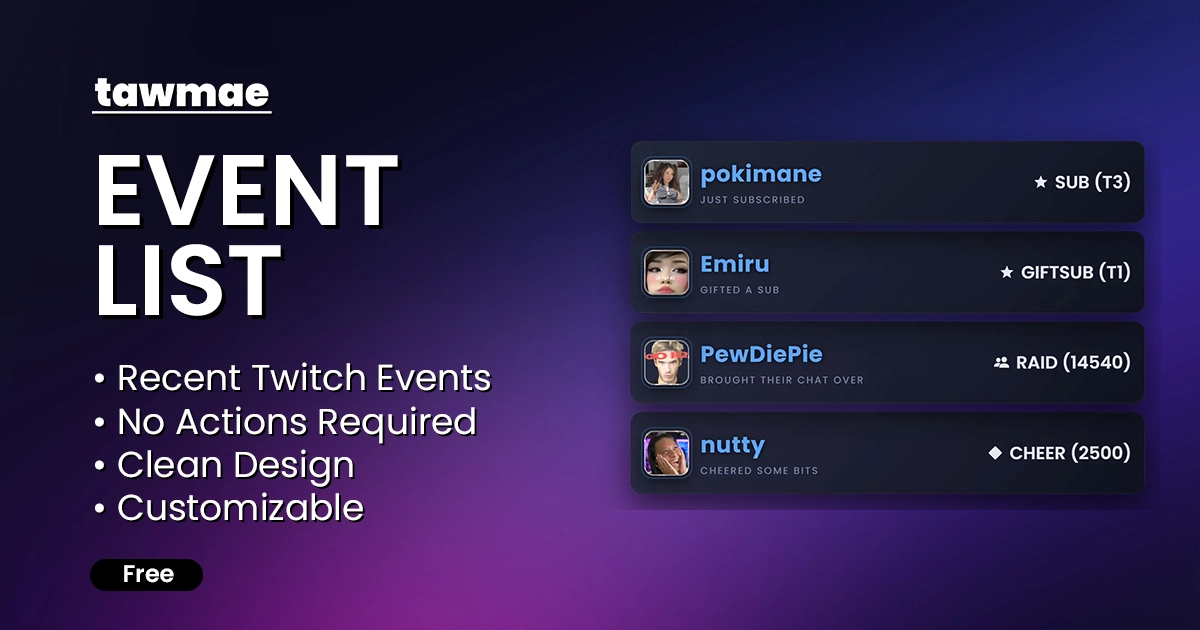
An OBS widget that displays your four most recent Twitch events, such as follows, subscriptions, cheers, or Ko-fi donations.

  • Shows your four most recent Twitch and Ko-fi events in one clean list
  • Fully local handling via Streamer.bot — no third-party alert services needed
  • Customize colors, fonts, sizes, and behavior via simple URL parameters
Event List preview

Quick Access

Copy what you need to get started. Follow the setup guide below for detailed instructions.

Browser Source URL

Add this as a browser source to OBS.
https://tawmae.xyz/overlays/event-list

Setup Guide

1

Start WebSocket Server

Go to the tab Servers/Clients → WebSocket Server. Enable Auto Start WebSocket Server. Address 127.0.0.1. Port 8080. Optional password. Leave Enforce All Requests unchecked. Start the server.

2

Copy Browser Source URL

Copy the Browser Source URL from Quick Access.

3

Add Browser Source in OBS

In OBS, create a new Browser Source, name it whatever you want. Then paste the copied URL into URL and preferably set the Width and Height to your OBS canvas size.

NoteIf you want to have the browser source in multiple scenes, don't create a second browser source. Instead, use nested scenes or source clones.
4

Done!

And you are done!

NoteIf you want to test it, you can create an empty action in Streamer.bot, add any of the Twitch triggers you want to test and hit 'Simulate'

Customization

You can add URL Parameters at the end of the browser source URL to customize the overlay. The first parameter starts with ?, and additional parameters are joined with &.

Example https://tawmae.xyz/overlays/event-list.html?font=Comic+Sans+MS&color=pink

Background Color

?color

Changes the background color of the individual event bars. Supports hex codes and gradients.

Examples
https://tawmae.xyz/overlays/event-list.html?color=whitehttps://tawmae.xyz/overlays/event-list.html?color=#fff

Username Color

?usernameColor

Changes the color of the username. Supports hex codes and gradients.

Examples
https://tawmae.xyz/overlays/event-list.html?usernameColor=whitehttps://tawmae.xyz/overlays/event-list.html?usernameColor=#fff

Event Text Color

?eventColor

Changes the color of the event text. Supports hex codes and gradients.

Examples
https://tawmae.xyz/overlays/event-list.html?eventColor=whitehttps://tawmae.xyz/overlays/event-list.html?eventColor=#fff

Font

?font

Changes the font used for the text. Supports standard fonts. Use a + character to replace spaces.

Examples
https://tawmae.xyz/overlays/event-list.html?font=Arialhttps://tawmae.xyz/overlays/event-list.html?font=Comic+Sans+MS

Username Font Size

?usernameSize

Changes the font size of the username. The default size is 32.

Examples
https://tawmae.xyz/overlays/event-list.html?usernameSize=20

Event Text Font Size

?eventSize

Changes the font size of the event text. The default size is 26.

Examples
https://tawmae.xyz/overlays/event-list.html?eventSize=20

Width

?width

Changes the width of the event container. The default width is 700px.

Examples
https://tawmae.xyz/overlays/event-list.html?width=1000px

Anonymous Follows

?anonymousFollows

Replaces the username and avatar with placeholders for follow events to allow followers to remain anonymous.

Examples
https://tawmae.xyz/overlays/event-list.html?anonymousFollows=true

Watchstreaks

?watchstreaks

Disables watchstreaks from showing in the event list.

Examples
https://tawmae.xyz/overlays/event-list.html?watchstreaks=false

Changelog

v1.1.1 latest

  • New Added YouTube support
  • Fix Fixed order issues between sessions

User Reviews

5.0 (2 reviews)

Before you post your review

Please make sure this is not a support issue. If you have trouble getting it to work, join my Discord, open a support post and attach your logs.

Join the Discord for support ↗