15,00 € TWITCH YOUTUBE DLL REQUIRED

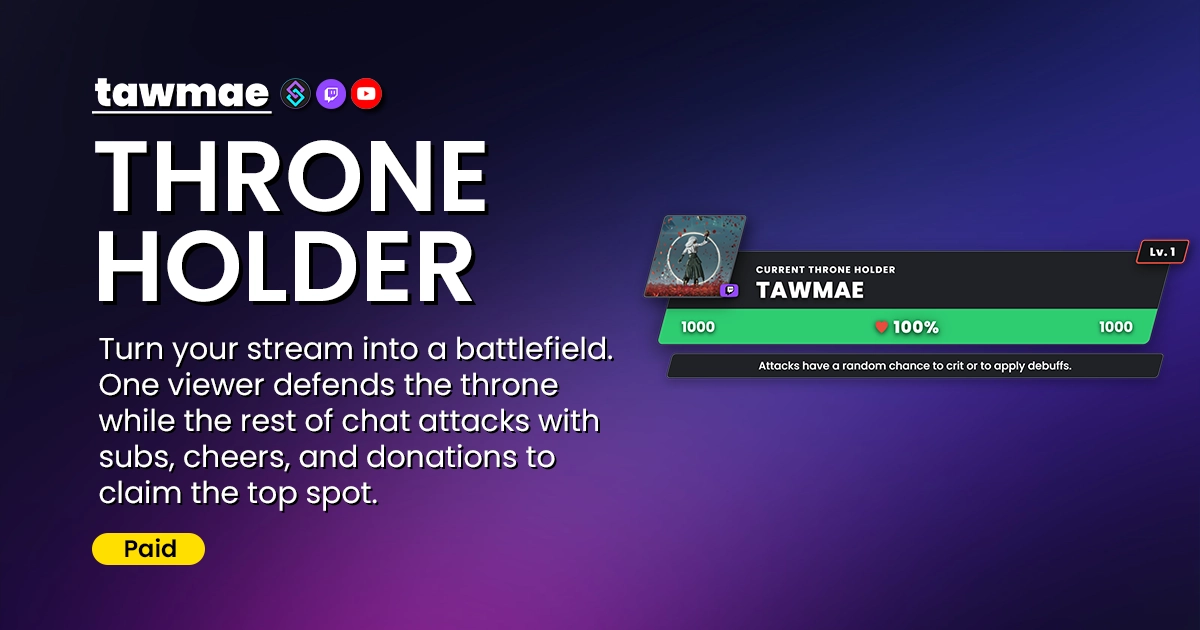
Turn your stream into a battlefield. One viewer defends the throne while the rest of chat attacks with subs, cheers, and donations to claim the top spot.

  • Includes loyalty points and XP rewards
  • Supports all kind of Twitch & YouTube events
  • Includes roleplay elements like leveling, buffs, debuffs, crit and healing.
  • Extremely customizable
Throne Holder preview

Quick Access

Copy what you need to get started. Follow the setup guide below for detailed instructions.

Action Import String

Import the actions into Streamer.bot.
U0JBRR+LCAAAAAAABAB1k99P2zAQx9+R+B9MXnghVdu1he1lQqCxPUybQNo0AQ8X+5pa+EfmH5QI9X+fndRpDV2kRPF9vnc+351fj48IKSQ6KD6R17gISwUSw7L4oz2xXIiW1FpbPCnOtgLwbqVNlDhYS8ABPKOxXKtIJqPxaDwAhpYa3rgBkmutTh2humkJd0T78C6JWyG5/vF9RH6vgDFoIVi4euLq9PMJmSYniwKpI6BY539GvMXO9aG4ivG+yUYb91CQyjsXNtxLW996dUm3aSgvRGKSKy69/DUcIMLINp2iYJCVCLoYNljuewtJqMOcxVOen1O6vFjQks6BlbPJgpXVbPyxpLNZVU3nbDG/WKTkOre/Hn1X+fH2KQ980pN5ooJKYNzVGY8ZeaHCM/xitPzKrdOmDaIlCPs/1U9UjKv6kCoNxl03FDfZUHSC2mjfREVmBbGG1obKH4ppQhu1HHryjlOtqDcGlTtEneF1HXoWG/G4D6yvLnc9eswjCgGNRXYTs+15wpv+J+n7jmQhgruUIefcuMbKavqE7g7N85t8dvBK8HCOHDouk35v3HYXafqht+BLHGpksUXpfk36Mr8f3v72lSCaFQTV8dHmHwkvWlbpAwAA

Choose your access

Checking your access…

Buy this extension
15,00 €One-time payment
  • Permanent access to this extension
  • Permanent access to updates and features
  • No recurring charge
Other payment methods

For Ko-fi, crypto or bank transfer, contact me on Discord or via email.

All extensions
9,99 € / monthMonthly subscription · PayPal
  • Import and update all paid extensions
  • Keep using the versions you obtain after your subscription ends
  • Cancel anytime · new imports and updates require an active subscription
PAYPAL CHECKOUT

Review your checkout

Terms and immediate access

Loading checkout…

Confirmation and invoices go to your PayPal email.

Browser Source URL

Add this as a browser source to OBS.
https://tawmae.xyz/overlays/example

Checking your access…

Buy this extension
15,00 €One-time payment
  • Permanent access to this extension
  • Permanent access to updates and features
  • No recurring charge
Other payment methods

For Ko-fi, crypto or bank transfer, contact me on Discord or via email.

All extensions
9,99 € / monthMonthly subscription · PayPal
  • Import and update all paid extensions
  • Keep using the versions you obtain after your subscription ends
  • Cancel anytime · new imports and updates require an active subscription

Setup Guide

Prefer watching?

A video tutorial is available for this extension. Watch the step-by-step guide to help you set everything up quickly and easily.

Watch on YouTube
1

Copy the Action Import String

Copy the Action Import text from Quick Access.

2

Import the actions into Streamer.bot

In Streamer.bot click Import in the top menu. Paste the text into the Import String field. Click Import at the bottom.

3

Enable the commands

Open the Commands tab. Find the imported group. Right-click the group and click Group → Enable All.

4

Run the Settings UI once

Open the action [THRONE HOLDER] [#] 0 - Settings. Right-click the Test trigger and hit Test Trigger to open the Settings UI once.

NoteIf the TawmaeUI.dll is missing, you’ll be asked to auto-download. That popup window may appear behind the Streamer.bot window, so make sure to check if nothing appears.
5

Start WebSocket Server

Go to the tab Servers/Clients → WebSocket Server. Enable Auto Start WebSocket Server. Address 127.0.0.1. Port 8080. Optional password. Leave Enforce All Requests unchecked. Start the server.

6

Copy Browser Source URL

Copy the Browser Source URL from Quick Access.

7

Add Browser Source in OBS

In OBS, create a new Browser Source, name it whatever you want. Then paste the copied URL into URL and set the Width and Height to your OBS canvas size (e.g. 1920x1080)

NoteIf you want to have the browser source in multiple scenes, don't create a second browser source. Instead, use nested scenes or source clones.
8

Done!

And you are done! You can not customize everything to your liking!

NoteIf you want to give it a test, simply rightclick the 'Test' trigger of any of the events of the '[THRONE HOLDER] [#] 1 - Handler' action.

Commands

User Commands

!throneholderPoints [Points Amount] Aliases: !thPoints Access Everyone

Uses loyalty points to contribute to damage or heal the throne holder.

Example!throneholderPoints 500
!throneholderStats [Username (optional)] Aliases: !thStats Access Everyone

Posts the individual user stats into chat.

Example!throneholderStats tawmae
!throneholderLeaderboard [Keyword (optional)] Aliases: !thLeaderboard Access Everyone

Posts the throne holder leaderboard into chat. You can enter one of those keywords: 'damage' / 'kill' / 'heal' / 'participation' / 'holder' / 'level' - and it will show the leaderboard of that stat.

Example!throneholderLeaderboard

Mod Commands

!setThroneholder [Username] Aliases: !setTh Access Mods Only

Set or change the current throne holder.

Example!setThroneholder tawmae
!damageThroneholder [HP] Aliases: !damageTh Access Mods Only

Damage the current throne holder by the specified HP amount.

Example!damageThroneholder 50
!healThroneholder [HP] Aliases: !healTh Access Mods Only

Heal the current throne holder by the specified HP amount.

Example!healThroneholder 50

Settings UI

General

General settings like rewards and other goodies.

  • Next Throne Holder Selection You can decide how the next throne holder is chosen.
  • Overflow Damage As Bonus HP If the killing blow deals excess damage and the user that has made the killing blow becomes throne holder, the excess damage will get added on top of their HP. So if the user who dealt the killing blow does NOT become thronme holder, the excess damage will just be lost and the new throne holder starts with the default HP.
  • Allow Overhealing Allows the throne holder to heal beyond 100%.
  • VIP Throneholder Decide whether to VIP the current throne holder. Once they lose the throne, they also lose their VIP status (obviously Twitch only).
  • Points Distribution Requires the TWITCH POINTS extension to work. You can decide whether points are distributed and if so, what the total amount is and how it's being distributed.
  • Currency Your target currency all donations and events like Super Stickers are converted to.
  • First Contributor Becomes Throne Holder There are two cases where the throne is empty: on the first install and if someone donates and didn't enter their correct Twitch/YouTube username on the donation platform. In this case, you can either set a new boss with a command or have the first contributor become throne holder.

Damage

Manage the damage values for each event type and whether the event contributes at all.

Appearance

Change all kinds of appearance features of the overlay. Fonts, colors, animations and icons.

Rotator

The rotator is the text box below the actual throne holder element. It rotates through the specified texts that can include useful hints so your viewers know what to do. You can toggle the duration per text but also disable it completely.

Overlay Texts

Change the text elements of the overlay to either customize to your style or translate them.

Advanced Settings

Called advanced for a reason. Has some very detailed settings regarding XP and HP for balancing purposes. Also includes buff and debuffs chances per attack.

Chat Responses

Edit chat responses. Use a single hyphen to skip a message. Allows to use variables that are listed below each textbox. Reset to default by clicking the icon on the right.

Custom Triggers

Throne Holder New

Fires when a new user becomes the Throne Holder.

%throneHolderUserId% Type: string

The ID of the current throne holder.

Example 12345678
%throneHolderUserName% Type: string

The login name of the throne holder.

Example johndoe
%throneHolderUser% Type: string

The display name of the throne holder.

Example JohnDoe
%throneHolderProfileImageUrl% Type: string

The avatar URL of the throne holder.

Example https://...
%platform% Type: string

The platform of the throne holder (e.g., twitch, youtube).

Example twitch
%level% Type: int

The current level of the throne holder.

Example 5
%xp% Type: float

The current XP of the throne holder.

Example 1250.5
%maxHp% Type: int

The max HP of the throne holder.

Example 1500
%currentHp% Type: int

The current HP of the throne holder.

Example 1500
%roundStartedUnix% Type: int

Unix timestamp of when the current round started.

Example 1711234567
%roundTotalDamageDealt% Type: int

Total damage dealt to the boss in this round.

Example 0
%roundTotalHealed% Type: int

Total HP healed for the boss in this round.

Example 0
%newThroneHolderUserId% Type: string

The ID of the new throne holder.

Example 12345678
%newThroneHolderUserName% Type: string

The display name of the new throne holder.

Example JohnDoe
%newThroneHolderLevel% Type: int

The starting level of the new throne holder.

Example 5
%newThroneHolderMaxHp% Type: int

The max HP of the new throne holder.

Example 1500
%newThroneHolderPlatform% Type: string

The platform of the new throne holder.

Example twitch
%newThroneHolderProfileImageUrl% Type: string

The avatar URL of the new throne holder.

Example https://...

Throne Holder Attacked

Fires when the Throne Holder takes damage.

%throneHolderUserId% Type: string

The ID of the current throne holder.

Example 12345678
%throneHolderUserName% Type: string

The login name of the throne holder.

Example johndoe
%throneHolderUser% Type: string

The display name of the throne holder.

Example JohnDoe
%throneHolderProfileImageUrl% Type: string

The avatar URL of the throne holder.

Example https://...
%platform% Type: string

The platform of the throne holder (e.g., twitch, youtube).

Example twitch
%level% Type: int

The current level of the throne holder.

Example 5
%xp% Type: float

The current XP of the throne holder.

Example 1250.5
%maxHp% Type: int

The max HP of the throne holder.

Example 1500
%currentHp% Type: int

The current HP of the throne holder before the attack.

Example 1000
%roundStartedUnix% Type: int

Unix timestamp of when the current round started.

Example 1711234567
%roundTotalDamageDealt% Type: int

Total damage dealt to the boss in this round.

Example 5000
%roundTotalHealed% Type: int

Total HP healed for the boss in this round.

Example 1200
%attackerUserId% Type: string

The ID of the user who attacked.

Example 87654321
%attackerUserName% Type: string

The name of the user who attacked.

Example JaneDoe
%damageDealt% Type: int

The actual amount of damage dealt to the boss.

Example 50
%newHp% Type: int

The HP of the boss after taking damage.

Example 950
%isCrit% Type: bool

Whether the attack was a critical hit.

Example true
%debuffsApplied% Type: string

Comma-separated list of debuffs applied during this attack.

Example Poison, Reduced Armor

Throne Holder Dodge

Fires when the Throne Holder successfully dodges an attack.

%throneHolderUserId% Type: string

The ID of the current throne holder.

Example 12345678
%throneHolderUserName% Type: string

The login name of the throne holder.

Example johndoe
%throneHolderUser% Type: string

The display name of the throne holder.

Example JohnDoe
%throneHolderProfileImageUrl% Type: string

The avatar URL of the throne holder.

Example https://...
%platform% Type: string

The platform of the throne holder (e.g., twitch, youtube).

Example twitch
%level% Type: int

The current level of the throne holder.

Example 5
%xp% Type: float

The current XP of the throne holder.

Example 1250.5
%maxHp% Type: int

The max HP of the throne holder.

Example 1500
%currentHp% Type: int

The current HP of the throne holder.

Example 1000
%roundStartedUnix% Type: int

Unix timestamp of when the current round started.

Example 1711234567
%roundTotalDamageDealt% Type: int

Total damage dealt to the boss in this round.

Example 5000
%roundTotalHealed% Type: int

Total HP healed for the boss in this round.

Example 1200
%attackerUserId% Type: string

The ID of the user whose attack was dodged.

Example 87654321
%attackerUserName% Type: string

The name of the user whose attack was dodged.

Example JaneDoe
%dodgeReason% Type: string

The reason for the dodge (e.g., 'buff' or 'level').

Example buff

Throne Holder Heal

Fires when the Throne Holder is healed.

%throneHolderUserId% Type: string

The ID of the current throne holder.

Example 12345678
%throneHolderUserName% Type: string

The login name of the throne holder.

Example johndoe
%throneHolderUser% Type: string

The display name of the throne holder.

Example JohnDoe
%throneHolderProfileImageUrl% Type: string

The avatar URL of the throne holder.

Example https://...
%platform% Type: string

The platform of the throne holder (e.g., twitch, youtube).

Example twitch
%level% Type: int

The current level of the throne holder.

Example 5
%xp% Type: float

The current XP of the throne holder.

Example 1250.5
%maxHp% Type: int

The max HP of the throne holder.

Example 1500
%currentHp% Type: int

The current HP of the throne holder before healing.

Example 500
%roundStartedUnix% Type: int

Unix timestamp of when the current round started.

Example 1711234567
%roundTotalDamageDealt% Type: int

Total damage dealt to the boss in this round.

Example 5000
%roundTotalHealed% Type: int

Total HP healed for the boss in this round.

Example 1200
%healerUserId% Type: string

The ID of the user who healed the boss.

Example 87654321
%healerUserName% Type: string

The name of the user who healed the boss.

Example JaneDoe
%healerPlatform% Type: string

The platform of the healer.

Example twitch
%healedHp% Type: int

The actual amount of HP restored.

Example 100
%newHp% Type: int

The HP of the boss after healing.

Example 600

Throne Holder Defeat

Fires when the Throne Holder's HP reaches 0 and is defeated.

%throneHolderUserId% Type: string

The ID of the current throne holder.

Example 12345678
%throneHolderUserName% Type: string

The login name of the throne holder.

Example johndoe
%throneHolderUser% Type: string

The display name of the throne holder.

Example JohnDoe
%throneHolderProfileImageUrl% Type: string

The avatar URL of the throne holder.

Example https://...
%platform% Type: string

The platform of the throne holder (e.g., twitch, youtube).

Example twitch
%level% Type: int

The current level of the throne holder.

Example 5
%xp% Type: float

The current XP of the throne holder.

Example 1250.5
%maxHp% Type: int

The max HP of the throne holder.

Example 1500
%currentHp% Type: int

The current HP of the throne holder.

Example 0
%roundStartedUnix% Type: int

Unix timestamp of when the current round started.

Example 1711234567
%roundTotalDamageDealt% Type: int

Total damage dealt to the boss in this round.

Example 5000
%roundTotalHealed% Type: int

Total HP healed for the boss in this round.

Example 1200
%killerUserId% Type: string

The ID of the user who dealt the killing blow.

Example 87654321
%killerUserName% Type: string

The name of the user who dealt the killing blow.

Example JaneDoe
%killerPlatform% Type: string

The platform of the killer.

Example twitch
%killingBlowDamage% Type: int

The raw damage value of the final attack before capping at current HP.

Example 200

Throne Holder User Level Up

Fires when any user (boss or attacker) levels up from gaining XP.

%throneHolderUserId% Type: string

The ID of the current throne holder.

Example 12345678
%throneHolderUserName% Type: string

The login name of the throne holder.

Example johndoe
%throneHolderUser% Type: string

The display name of the throne holder.

Example JohnDoe
%throneHolderProfileImageUrl% Type: string

The avatar URL of the throne holder.

Example https://...
%platform% Type: string

The platform of the throne holder (e.g., twitch, youtube).

Example twitch
%level% Type: int

The current level of the throne holder.

Example 5
%xp% Type: float

The current XP of the throne holder.

Example 1250.5
%maxHp% Type: int

The max HP of the throne holder.

Example 1500
%currentHp% Type: int

The current HP of the throne holder.

Example 1000
%roundStartedUnix% Type: int

Unix timestamp of when the current round started.

Example 1711234567
%roundTotalDamageDealt% Type: int

Total damage dealt to the boss in this round.

Example 5000
%roundTotalHealed% Type: int

Total HP healed for the boss in this round.

Example 1200
%levelUpUserId% Type: string

The ID of the user who leveled up.

Example 87654321
%levelUpUserName% Type: string

The name of the user who leveled up.

Example JaneDoe
%levelUpUserPlatform% Type: string

The platform of the user who leveled up.

Example twitch
%newLevel% Type: int

The new level the user achieved.

Example 6

Throne Holder Buff Applied

Fires when a buff or debuff is applied to the Throne Holder.

%throneHolderUserId% Type: string

The ID of the current throne holder.

Example 12345678
%throneHolderUserName% Type: string

The login name of the throne holder.

Example johndoe
%throneHolderUser% Type: string

The display name of the throne holder.

Example JohnDoe
%throneHolderProfileImageUrl% Type: string

The avatar URL of the throne holder.

Example https://...
%platform% Type: string

The platform of the throne holder (e.g., twitch, youtube).

Example twitch
%level% Type: int

The current level of the throne holder.

Example 5
%xp% Type: float

The current XP of the throne holder.

Example 1250.5
%maxHp% Type: int

The max HP of the throne holder.

Example 1500
%currentHp% Type: int

The current HP of the throne holder.

Example 1000
%roundStartedUnix% Type: int

Unix timestamp of when the current round started.

Example 1711234567
%roundTotalDamageDealt% Type: int

Total damage dealt to the boss in this round.

Example 5000
%roundTotalHealed% Type: int

Total HP healed for the boss in this round.

Example 1200
%effectKey% Type: string

The internal system key of the effect.

Example critVuln
%effectName% Type: string

The formatted display name of the effect.

Example Crit Vulnerability
%effectType% Type: string

Whether the effect is a 'buff' or 'debuff'.

Example debuff
%durationSeconds% Type: int

How many seconds the effect will last.

Example 60

Throne Holder Buff Worn Off

Fires when a buff or debuff expires or is cleared from the Throne Holder.

%throneHolderUserId% Type: string

The ID of the current throne holder.

Example 12345678
%throneHolderUserName% Type: string

The login name of the throne holder.

Example johndoe
%throneHolderUser% Type: string

The display name of the throne holder.

Example JohnDoe
%throneHolderProfileImageUrl% Type: string

The avatar URL of the throne holder.

Example https://...
%platform% Type: string

The platform of the throne holder (e.g., twitch, youtube).

Example twitch
%level% Type: int

The current level of the throne holder.

Example 5
%xp% Type: float

The current XP of the throne holder.

Example 1250.5
%maxHp% Type: int

The max HP of the throne holder.

Example 1500
%currentHp% Type: int

The current HP of the throne holder.

Example 1000
%roundStartedUnix% Type: int

Unix timestamp of when the current round started.

Example 1711234567
%roundTotalDamageDealt% Type: int

Total damage dealt to the boss in this round.

Example 5000
%roundTotalHealed% Type: int

Total HP healed for the boss in this round.

Example 1200
%effectKey% Type: string

The internal system key of the effect.

Example poison
%effectName% Type: string

The formatted display name of the effect.

Example Poison
%effectType% Type: string

Whether the effect is a 'buff' or 'debuff'.

Example debuff

FAQ

Can I make the excess damage overflow?
Yes, at the bottom of the General tab, you can enable it (it's enabled by default). Note that excess damage only gets added as HP if the next throne holder also did the last blow. If the last blow was performed by someone other than the new throne holder, the excess damage will be lost and the new throne holder will start with their regular HP.
What are the rewards?
The different reward types viewers can get are:

1. VIP for the current throne holder (Twitch only).
2. Loyalty Points (requires the TWITCH POINTS extension). Points distribution can be altered, either based on the last hit, equal to all contributors, weighted by damage dealt etc.
3. XP (increases HP, armor and dodge chance)
What buffs and debuffs are there?
Buffs:
1. Increased Armor - reduces incoming damage from all sources.
2. Crit Immunity - makes the throne holder immune to critical hits.
3. Increased Dodge Chance - the throne holder is able to dodge attacks.

Debuffs:
1. Poison - prevents the throne holder from healing.
2. Crit Vulnerability - makes the throne holder prone to critical hits.
3. Reduced armor - increases damage from all sources.
How are buffs and debuffs applied?
Each attack has a base chance to trigger a debuff on the throne holder. And each heal has a base chance to trigger a buff. But there are also the actions to trigger buffs and debuffs, in case you want to integrate them into something else. A good example would be items from the USER INVENTORY extension. It would allow people to use a Poison Vile to poison the throne holder.
How does healing work?
A throne holder that contributes with events like subs etc. will heal themself. So essentially everyone else contributing = damaging; throne holder contributing = healing. They heal themselves by the same amount as others damage. The only exception is a poison debuff that prevents healing. There is also one template action called [THRONE HOLDER] [B] - Heal Throne Holder Template that allows for other users to heal the throne holder. It has no trigger by default, you can decide which one it is. More about those template actions can be read down below in the FAQ.
If donations from 3rd party platforms can contribute, how do we know the Twitch/YouTube user?
That's the fun part, we don't! Some platforms have a setting that forces the platform username, but in some cases they won't match. If a user has a username on Kofi that doesn't match with their Twitch or YouTube username, and it happens to be the final blow, so they would theoretically become the new throne holder, then the throne will be empty instead. But if the username matches, it's all gucci.
What are levels doing?
The higher the level, the higher the HP, armor and dodge chance is. Increased armor lowers all incoming damage, dodge chance allows to complete negate an attack's damage.
Can I avoid that my permanent VIPs or temporary VIPs lose their VIP status after losing the throne?
Yes, temporary VIPs from my extension are being handled automatically. If they're a temporary VIP, they won't lose their badge.

As for your permanent VIPs: In the Advanced Settings tab of the Settings UI, you can scroll all the way down until you find the Excluded Group For VIPs setting. Add your permanent VIPs to a Streamer.bot group and select that group in the dropdown. The users in that group won't lose their VIP badge after losing the throne.
Can I reset all user stats and data?
Yes, at the bottom of the 'Advanced Settings' tab in the Settings UI, there's a button to reset all data. This cannot be undone.
What are the template damage and healing actions for and how can I use them?
v.1.0.5 of the extension added two actions: [THRONE HOLDER] [B] - Heal Throne Holder Template and [THRONE HOLDER] [B] - Damage Throne Holder Template. They don't have a trigger by default, but you can set one. A good example would be to add them as a reward in the USER INVENTORY extension. You could add a Healing Potion that triggers the heal template action and a Fire Bomb that triggers the damage template action. It allows you to create your own custom healing and damaging events outside of the ones that are already in place, which are mostly based on Twitch and YouTube interactions. They use specific variables to determine the user and damage/healing value, those are listed in the actions. If you need further help with those, please join my Discord and create a support post.

Also here is a video tutorial on how to integrate items from the USER INVENTORY extension with those template actions: https://www.youtube.com/watch?v=e7iBZIKJyiY

Changelog

v1.0.9 latest

  • New Added support for Custom Power Ups (Twitch)

v1.0.8

  • Changed Damage-weighted throne succession now also considers overflow damage
  • Fix User Data Reset button in the Settings UI now actually works

v1.0.7

  • Fix Fixed contributions not showing correctly in the stats action
  • Fix Fixed contributions not adding up for heals
  • New Added 'Damage Taken' as a tracked stat
  • New Added an additional response for critical attacks
  • Changed Changed default XP values in the Settings UI
  • Changed If Overflow Damage is enabled, dealt excess damage gives more XP

v1.0.6

  • New Every event triggered during a boss transition is now queued and released once the new throne holder rises, so the contribution isn't lost; loyalty points are an exception, but they now have a proper chat response and will not be deducted.
  • New Added a new option into the 'General' tab of the Settings UI: 'Overflow Damage As Bonus HP'. If the killing blow deals excess damage and the user that has made the killing blow becomes throne holder, the excess damage will get added on top of their HP.
  • New Added a new option into the 'General' tab of the Settings UI: 'Allow Overhealing'. Allows the throne holder to heal beyond 100%.
  • Changed Added '%pointsName%' as variables for chat responses utilizing loyalty points.

v1.0.5

  • New Added two new template actions for dealing damage and healing. You can now use your custom triggers for those; it also allows for other users than the throne holder to heal. See FAQ for usage.
  • Changed Added some safety checks to refund channel points during the throne holder transition

v1.0.4

  • New Added option to reset throne at Streamer.bot startup into the 'Advanced Settings' tab of the Settings UI
  • Removed Removed one killing blow message to reduce message output
  • Changed Changed a lot default values; including default damage values
  • Changed Changed some of the default message templates
  • Changed Dealt with loyalty points overflow: if you invest more points than needed to kill someone or more than needed to fully heal yourself, it will only deduct the loyalty points needed to finish instead of everything.
  • Fix Fixed that first contribution with loyalty points didn't put the contributor on the throne
  • New Added a C# method to manually clear the throne (no action, but you can easily add one)

v1.0.3

  • New - Added the option to enter keywords to the leaderboard to extract leaderboards for specific stats, not just 'times as throne holder'
  • New - Added a button to reset all user's data and stats to the 'Advanced Settings' tab of the Settings UI
  • Fix - Fixed an issue when an empty throne, after killing the throne holder with an admin command, wasn't filled again with the first contributor

v1.0.2

  • New Added actions to manually show & hide the overlay
  • New Added a duration slider to determine when the auto-hide triggers
  • Fix Fixed an issue where if no eligible throne holder was found, the overlay didn't update correctly after a new throne holder was set

v1.0.1

  • New Added Command Aliases
  • New Added 'VIP Excluded Group' to the Advanced Settings; allows to add a user group that keeps their VIP after losing the throne
  • New Added that users with a temporary VIP status will not lose their badge after losing their throne
  • New Added custom triggers
  • New Added tracking for all contributions per user and added them to the 'Get Stats' command
  • Fix Fixed an issue with loyalty points attacks going through after the boss has been defeated already
  • Changed Adjusted some default settings values (leaderboard & stats one-message-per-rank to 'false'; increased armor and dodge gain for each level a little)

v1.0.0

  • New Release

User Reviews

5.0 (6 reviews)

Absolutely awesome extension! Can´t wait to test it live on stream. Thanks a bunch Tawmae!

I just started using this extension and I’m already loving it! It’s a super simple and effective way to get the chat involved and add some fun competition to the stream. Definitely a great pick-up if you are looking to boost engagement and give your community something to interact with.

This right here is an engagement booster! Even managed to get some lurkers to come out from the shadows and inflict some damage to dethrone the holder! A great extension to use with the Loyalty Points utility, really gets chat spending them %points% and redeeming some rewards!

Tawmae has once again stirred up the competativeness in my chat with this amazing extension. They were holding on to thousands of loyalty points that they all threw down to see who could hold the Throne! Its also so very customizable that I can adjust any value on the fly as needed. HIGHLY reccomend this extension!

Before you post your review

Please make sure this is not a support issue. If you have trouble getting it to work, join my Discord, open a support post and attach your logs.

Join the Discord for support ↗