
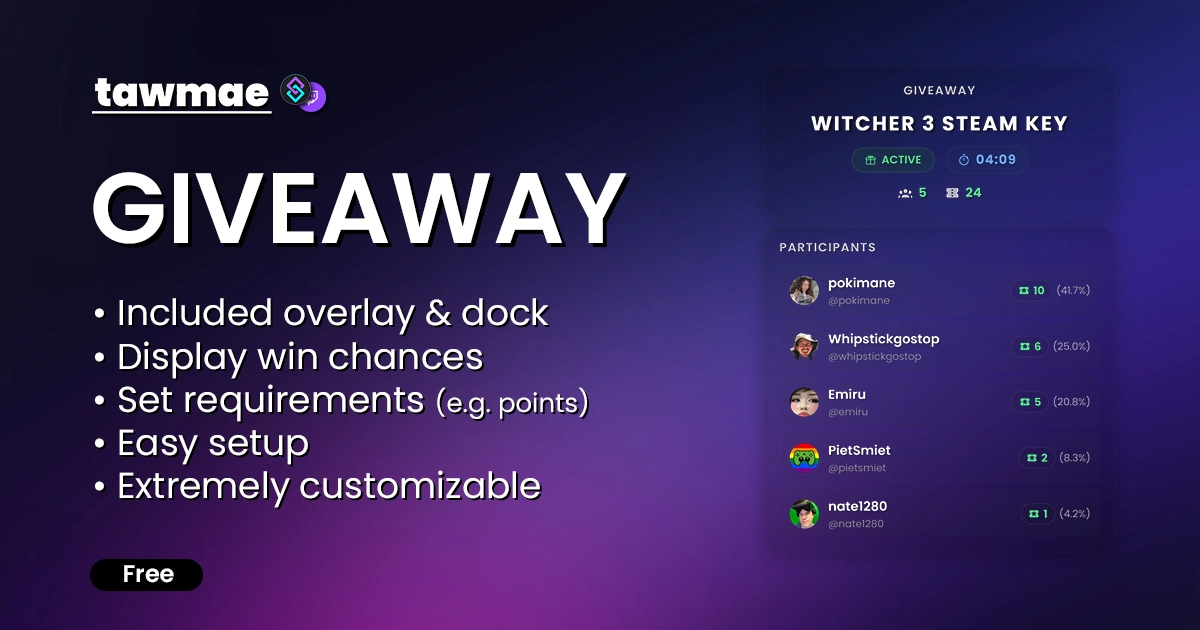
Overlay
A browser source overlay that displays the current giveaway state and all participants on your OBS canvas (or Meld, whatever).
Browser Source URL:
https://tawmae.xyz/overlays/giveaway-overlay
Copy what you need to get started. Follow the setup guide below for detailed instructions.
Copy the Action Import text from

In

Open the

Open the action

If you want to use overlay and/or OBS dock, go to the tab

Copy the Browser Source URL from

In

Copy the Dock URL from
In

You can now customize everything and use the commands and the dock to create and manage your giveaways!
https://tawmae.xyz/overlays/giveaway-overlayhttps://tawmae.xyz/overlays/giveaway-dock
!enter <Entry Count (optional)> Enter the giveaway. Allows to enter the number of entries you want to use, which is optional. Entering no number either adds 1 entry or the max. possible entries, depending on your settings.
!enter 5!giveaway Posts the info about the currently active giveaway into chat.
!giveaway!startGiveaway <Title (optional)> Start a giveaway. You can enter a title, but you don't have to.
!startGiveaway Witcher 3 Steam Key!pickWinner Picks a random winner.
!pickWinner!lockGiveaway Locks the giveaway and prevents users from entering.
!lockGiveaway!unlockGiveaway Unlocks the giveaway and allows users to enter again..
!unlockGiveaway!endGiveaway Ends the giveaway without clearing the overlay. This does not refund loyalty points.
!endGiveaway!cancelGiveaway Cancels the current giveaway. This will refund any invested loyalty points.
!cancelGiveaway!clearGiveaway Ends the giveaway and clears the overlay. This does not refund loyalty points.
!clearGiveawayConfigure some general stuff, idk what to write.

Configure the max. entries for each user group and their priority.

Change the appearance of the OBS overlay (not the dock).

Edit chat responses. Use a single hyphen to not post a message. Allows to use variables that are listed below each textbox. Reset to default by clicking the icon on the right.

Fires when a new giveaway is created.
%title% Type: string The title of the giveaway.
%durationSeconds% Type: int Duration of the giveaway in seconds.
%pointsCost% Type: int The cost in points to enter (0 if free/disabled).
%pointsEnabled% Type: bool Indicator if points are required to enter.
%createdBy% Type: string The display name of the user who started the giveaway.
Fires when a user successfully enters the giveaway.
%user% Type: string The display name of the user entering.
%userId% Type: string The Twitch User ID of the user.
%userName% Type: string The login name (username) of the user.
%entries% Type: int The user's total entries after this action.
%entriesAdded% Type: int The specific amount of entries added in this action.
%maxEntries% Type: int The maximum entries allowed for this specific user.
%winChance% Type: double The user's probability of winning (percentage).
%title% Type: string The title of the giveaway.
%totalParticipants% Type: int Total number of unique participants.
%totalEntries% Type: int Total number of entries in the giveaway.
Fires when a winner is selected.
%winner% Type: string The display name of the winner.
%winnerUserId% Type: string The Twitch User ID of the winner.
%winnerUserName% Type: string The login name of the winner.
%winnerEntries% Type: int Number of entries the winner had.
%requiresClaim% Type: bool Indicator if the winner must manually claim the prize.
%claimSeconds% Type: int Time in seconds allowed for claiming (if required).
%title% Type: string The title of the giveaway.
%totalParticipants% Type: int Total number of unique participants.
%totalEntries% Type: int Total number of entries in the giveaway.
%winnersCount% Type: int Total number of winners picked so far.
Fires when the giveaway is locked (entries closed).
%title% Type: string The title of the giveaway.
%totalParticipants% Type: int Total number of unique participants.
%totalEntries% Type: int Total number of entries in the giveaway.
%lockedBy% Type: string The display name of the user who locked the giveaway.
Fires when a locked giveaway is reopened.
%title% Type: string The title of the giveaway.
%totalParticipants% Type: int Total number of unique participants.
%totalEntries% Type: int Total number of entries in the giveaway.
Fires when the giveaway is cancelled.
%title% Type: string The title of the giveaway.
%totalParticipants% Type: int Total number of unique participants.
%totalEntries% Type: int Total number of entries in the giveaway.
%refundedPoints% Type: int Total amount of points refunded to users.
%cancelledBy% Type: string The display name of the user who cancelled the giveaway.
Fires when the giveaway is formally ended.
%title% Type: string The title of the giveaway.
%totalParticipants% Type: int Total number of unique participants.
%totalEntries% Type: int Total number of entries in the giveaway.
%winnersCount% Type: int Total number of winners.
%winners% Type: object List of winner display names.
%endedBy% Type: string The display name of the user who ended the giveaway.
Fires when a participant is manually removed from the giveaway.
%user% Type: string The display name of the removed user.
%userId% Type: string The Twitch User ID of the removed user.
%userName% Type: string The login name of the removed user.
%entries% Type: int The number of entries the user had.
%refundedPoints% Type: int Points refunded to the user (if any).
%title% Type: string The title of the giveaway.
%totalParticipants% Type: int Updated total number of unique participants.
%totalEntries% Type: int Updated total number of entries.
Please sign into your Twitch account to submit a review :3
The best Giveaway Extension i ever used! - The overlay looks so clean i just love it! - It's easy to setup and just need a few tweakings like text Messages
When I turn on streamerbot, I get a notification to update on the screen, when I click on it, this page opens...where should I download the update?
I love this extension, Great work Tawmae
Wunderbares Tool - nutzen es sehr gerne - vielen Dank dafür! Optisch und funktionell Mega. Vielen Dank.
I am in LOVE with this! Thank you!!
Very Nice tool,thx


