TWITCH YOUTUBE DLL REQUIRED

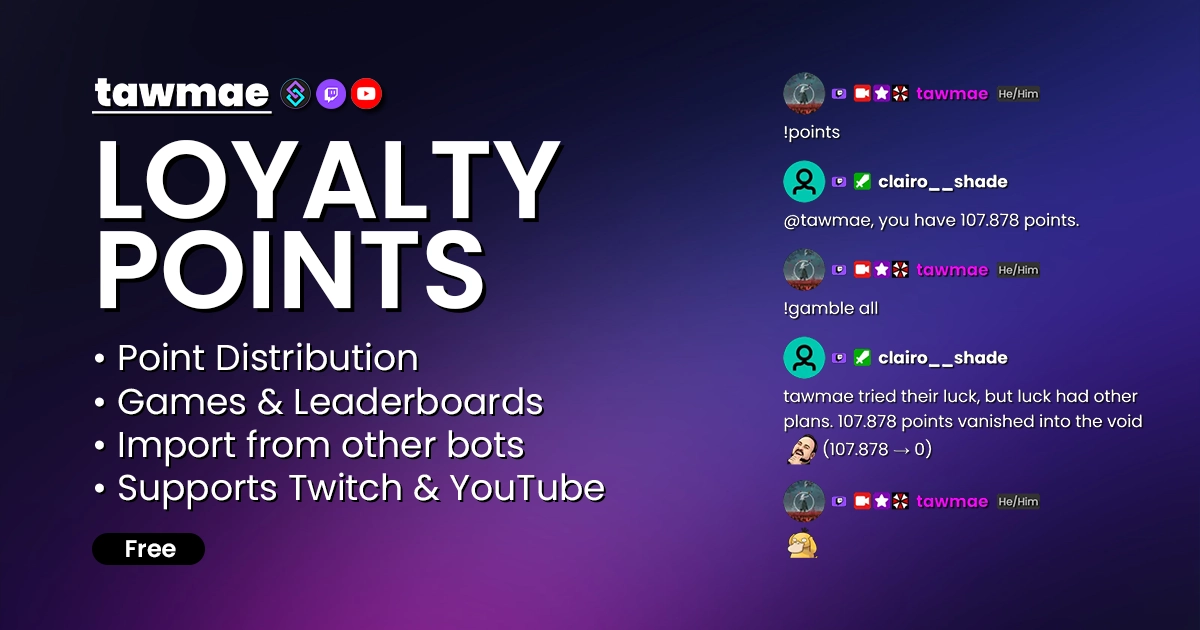
A fully featured loyalty points system for Twitch & YouTube, powered by Streamer.bot. Fully customizable, with built-in games and support for importing data from other bots.

  • Distribute points for watchtime and special events
  • Integrated Games
  • Integrated leaderboard
  • Extremely customizable
  • One-Click imports from other bots
    • StreamElements, Streamlabs, MixItUp, Firebot, Wizebot & Deepbot
LOYALTY POINTS Preview 1
LOYALTY POINTS Preview 2

Quick Access

Copy what you need to get started. Follow the setup guide below for detailed instructions.

Action Import String

Import the actions into Streamer.bot.
Loading…

Setup Guide

1

Copy the Action Import String

Copy the Action Import text from Quick Access.

2

Import the actions into Streamer.bot

In Streamer.bot click Import in the top menu. Paste the text into the Import String field. Click Import at the bottom.

3

Enable the commands

Open the Commands tab. Find the imported group. Right-click the group and click Enable All.

4

Open the Settings UI once

Open the action [LOYALTY POINTS] [#] 0 - Settings. Right-click the Test trigger and hit Test Trigger. Click Save.

NoteIf the TawmaeUI.dll is missing, you'll be asked to auto-download. That popup window may appear behind the Streamer.bot window, so make sure to check if nothing appears.
5

Done!

You can now start customizing or just enjoy the default settings!

Commands

Points System – Core

!addPoints [User] [Amount] Access Mods Only

Manually add points to a user's balance.

Example!addPoints @user 100
!removePoints [User] [Amount] Access Mods Only

Manually remove points from a user's balance.

Example!removePoints @user 50
!givePoints [User] [Amount] Access Everyone

Transfer your own points to a user.

Example!givePoints @user 25
!points Access Everyone

Display your own points balance in chat.

Example!points
!pointsLeaderboard Access Everyone

Display the points leaderboard in chat.

Example!pointsLeaderboard

Points System – Mass Actions

!addToAllPresent [Amount] Access Mods Only

Adds points to all present viewers.

Example!addToAllPresent 10
!addToAllUsers [Amount] Access Mods Only

Adds points to all users who already have points data.

Example!addToAllUsers 10
!multiplayAllUsersPoints [Amount] Access Mods Only

Multiplies points for all users who already have points data.

Example!multiplayAllUsersPoints 2
!enableHappyHour [%-Amount] | [Duration] Access Mods Only

Enables a happy hour bonus for all users. The amount is a percentage increase (e.g. +50% bonus). The duration can be a number for seconds or something like 10min for 10 minutes.

Example!enableHappyHour 50% | 15min

Gambling

!gamble [Amount] Access Everyone

50:50 to double or lose your bet. Supports 'all'.

Example!gamble 100

Duels

!duel [User] [Amount] Access Everyone

Challenge a user to a duel. Higher random roll wins.

Example!duel @user 50
!accept [User] Access Everyone

Accept a pending duel.

Example!accept @user

Rumble

!rumble Access Mods Only

Start a rumble game. One random winner gets the prize.

Example!rumble
!enter Access Everyone

Enter the active rumble.

Example!enter

Scratch Card

!scratchCard Access Everyone

Purchase a scratch card.

Example!scratchCard

Tax System

!collectTaxes Access Mods Only

Collects taxes from users.

Example!collectTaxes

Settings UI

General

Configure core points system behavior like naming, transfers and how messages are posted in chat.

  • Points Name How your points are called in chat messages (e.g. coins, snacks, points).
  • Allow Fetching Points From Other Users If enabled, viewers can fetch another user's balance via '!points [User]'.
  • Allow Points Transfer If enabled, viewers can transfer points to each other using '!givePoints [User]'.
  • Points Transfer Fees Optional percentage fee applied when transferring points from one user to another.
  • Send Messages As Replies If enabled, bot posts direct reply messages instead of regular chat messages.

Watchtime Points

Distribute points automatically based on watchtime, with role-based bonuses and group exclusions.

  • Points Distribution Set how many points are distributed in the given interval, e.g. 10 points every 1 minute.
  • Live Requirement If enabled, watchtime points are only awarded while the channel is live.
  • Excluded Group Users in this group do not receive watchtime points (cloud bots, broadcaster and bot are excluded by default).
  • Points For Moderators Optional custom points-per-minute value for moderators. If disabled, they receive the base rate.
  • Points For VIPs Optional custom points-per-minute value for VIPs. If disabled, they receive the base rate.
  • Points For Subscribers Optional custom points-per-minute value for subscribers based on their tiers. If disabled, they receive the base rate.
  • Bonus Group (Points) You can select a specific group. All users in that group receive bonus points.

Bonus Points

Award additional bonus points for special events like follows, subs, bits, chat activity and raids.

  • First Words Awards bonus points for a viewer's first message of the current stream session.
  • Follow Awards points for following the channel. Includes abuse-prevention against repeated follow/unfollow.
  • Tier 1 Subscription Awards bonus points for a Tier 1 subscription.
  • Tier 2 Subscription Awards bonus points for a Tier 2 subscription.
  • Tier 3 Subscription Awards bonus points for a Tier 3 subscription.
  • Tier 1 Gift-Subscription Awards bonus points for Tier 1 gift subs. Multiple gifts act as a multiplier.
  • Tier 2 Gift-Subscription Awards bonus points for Tier 2 gift subs. Multiple gifts act as a multiplier.
  • Tier 3 Gift-Subscription Awards bonus points for Tier 3 gift subs. Multiple gifts act as a multiplier.
  • Cheers Awards points per cheered bit. The configured value is applied per single bit.
  • Watch Streaks Awards points for watch streaks. The configured value is applied per stream in the streak.
  • Raid Awards points for raiding the channel.
  • Chat Messages If enabled, awards points for sending chat messages.
  • Chat Message Cooldown Cooldown in seconds between chat message bonuses to prevent spam abuse.

Games & Features

Enable and fine-tune interactive points-based games like gambling, duels, rumbles, scratch cards and tax collection.

  • Gamble Enables the '!gamble [Amount]' command for pure gambling using channel points.
  • Win Chance Win probability in percent for gambles. 50 means a fair 50:50 gamble.
  • Gambling Limit Optional maximum amount a viewer can gamble per stream. Disabled if the toggle is off.
  • All-Or-Nothing Mode If enabled, viewers may only use '!gamble all' instead of arbitrary amounts.
  • Duels Enables head-to-head point duels via '!duel [Username] [Amount]' and '!accept [Username]'.
  • Duel Limit Maximum number of points that can be used in a single duel.
  • Time To Accept How long (in seconds) the challenged user has to accept a duel.
  • Rumble Enables free-for-all rumble matches started with '!rumble' and joined via '!enter'.
  • Points Prize Base amount of points the rumble winner receives.
  • Entry Fee Optional entry fee for joining a rumble. If enabled, each join costs the configured amount.
  • Add Entry Fees To Prize If enabled, collected entry fees are added on top of the rumble prize pool.
  • Time To Join Join window in seconds after starting a rumble.
  • Eliminate 1-by-1 If enabled, users are eliminated one by one; otherwise the winner is picked immediately after locking.
  • Scratch Cards Enables buying scratch cards via '!scratchCard'. Purchases feed into a jackpot.
  • Purchase Limit Optional per-stream limit of scratch cards per viewer. Disabled if the toggle is off.
  • Scratch Card Price Price per scratch card. Each ticket purchase increases the jackpot.
  • Starting Jackpot Base jackpot amount before any tickets are purchased.
  • Jackpot Chance Percentage chance to win the jackpot (e.g. 0.01 means a 0.01% chance).
  • Tax Allowance Users below this points amount are completely exempt from tax collection.
  • Tax Percentage Rate Percentage of a user's points to be collected during tax events.
  • Tax Usage Controls what happens to collected taxes: delete, distribute to everyone, distribute to active users or add to the scratch card jackpot.

Leaderboard

Configure how the points leaderboard is generated and formatted when posted to chat.

  • Ranks To Show Number of top ranks included in the leaderboard output.
  • One Message Per Rank If enabled, each rank is posted as a separate message instead of combining all into one.
  • Excluded Group Users in this group are excluded from the leaderboard (bots and broadcaster are excluded by default).
  • Leaderboard Title Template for the leaderboard header. Supports variables: %user%, %rankAmount%, %pointsName%.
  • Rank Format Template for each rank line. Supports variables: %rank%, %user%, %points%, %pointsName%.
  • Rank Separator Symbol(s) Characters used to separate ranks when shown in a single message.
  • Show Redeemer's Rank If enabled, also shows the redeemer's own rank when they are not in the top list.

Advanced

Adjust internal variable names, validate and export data, migrate from old variables or reset all points.

  • Global Variable Name Internal name of the global variable used to store points (only affects Streamer.bot storage, not the display name).
  • Validate Points Scans and cleans stored points data to remove invalid values.
  • Points Export Filepath Filepath where the exported points text file is written. If empty, uses the Streamer.bot directory.
  • Export Points Creates an export file for all current Streamer.bot points.
  • Old Variable Name Name of the global variable to transfer points from.
  • Transfer Points Transfers points from the old global variable into the configured global variable name.
  • Reset All User Points Completely resets all user points. This action cannot be undone.

Chat Responses

Edit all chat responses used by the points system. Use a single hyphen to disable a specific message. Variables are listed below each textbox; you can reset any field back to default via the icon on the right.

Import Points From Other Platforms

Import existing points from other bots or platforms into this Streamer.bot points system.

Custom Triggers

Gamble Finished

Fires when a gamble game finishes.

%user% Type: string

The username of the gambler.

%userId% Type: string

The ID of the gambler.

%hasWon% Type: bool

Whether the gambler won.

%wentAllIn% Type: bool

Whether the gambler went all in.

%pointsGambled% Type: int

The number of points gambled.

%pointsBefore% Type: int

Points before the gamble.

%pointsAfter% Type: int

Points after the gamble.

Rumble Started

Fires when a new rumble starts.

%pointsPrize% Type: int

Total points prize for the rumble.

%timeToJoin% Type: int

Time in seconds to join the rumble.

%entryFeeValue% Type: int

Points fee required to enter.

Rumble Entered

Fires when a user enters the rumble.

%user% Type: string

Username of the entrant.

%userId% Type: string

ID of the entrant.

%pointsBeforeEntry% Type: int

Points before joining.

%pointsAfterEntry% Type: int

Points after joining.

Rumble Finished

Fires when the rumble ends.

%winnerUser% Type: string

Username of the winner.

%winnerUserId% Type: string

ID of the winner.

%wonPoints% Type: int

Points won by the winner.

%defeatedUserCount% Type: int

Number of opponents defeated.

Duel Challenged

Fires when a duel is challenged.

%challengerUser% Type: string

Username of the challenger.

%challengerUserId% Type: string

ID of the challenger.

%challengedUser% Type: string

Username of the challenged.

%challengedUserId% Type: string

ID of the challenged.

%duelsAcceptTime% Type: datetime

Expiration time for accepting the duel.

Duel Accepted

Fires when a duel is accepted.

%challengerUser% Type: string

Username of the challenger.

%challengerUserId% Type: string

ID of the challenger.

%challengedUser% Type: string

Username of the challenged.

%challengedUserId% Type: string

ID of the challenged.

%duelsAcceptTime% Type: datetime

Time when the duel was accepted.

Duel Finished

Fires when a duel finishes.

%victoriousUser% Type: string

Username of the winner.

%victoriousUserId% Type: string

ID of the winner.

%victoriousUser_oldPointsValue% Type: int

Winner’s points before duel.

%victoriousUser_newPointsValue% Type: int

Winner’s points after duel.

%defeatedUser% Type: string

Username of the defeated.

%defeatedUserId% Type: string

ID of the defeated.

%defeatedUser_oldPointsValue% Type: int

Loser’s points before duel.

%defeatedUser_newPointsValue% Type: int

Loser’s points after duel.

Duel Expired

Fires when a duel challenge expires without acceptance.

%challengerUser% Type: string

Username of the challenger.

%challengerUserId% Type: string

ID of the challenger.

%challengedUser% Type: string

Username of the challenged.

%challengedUserId% Type: string

ID of the challenged.

%duelsAcceptTime% Type: datetime

Time when the challenge expired.

Scratch Card Won

Fires when a scratch card reveals a win.

%user% Type: string

Username of the player.

%userId% Type: string

ID of the player.

%jackpotValue% Type: int

Points won from the scratch.

%pointsBefore% Type: int

Points before scratching.

%pointsAfter% Type: int

Points after scratching.

Scratch Card Lost

Fires when a scratch card reveals a loss.

%user% Type: string

Username of the player.

%userId% Type: string

ID of the player.

%jackpotValue% Type: int

Potential jackpot value of the scratch.

%pointsBefore% Type: int

Points before scratching.

%pointsAfter% Type: int

Points after scratching.

Taxes Collected

Fires when a tax collection is executed.

%totalCollectedPoints% Type: int

Total points collected by tax.

%totalCollectedUserCount% Type: int

Number of users taxed.

%skippedAllowanceUserCount% Type: int

Users skipped due to allowance.

%taxRate% Type: float

Percentage rate applied.

%pointsName% Type: string

Name of the points.

%taxMode% Type: string

Chosen mode: Delete, Distribute, or Add To Scratch Card Jackpot.

%distributedAmountPerUser% Type: int

Points each user received when distributing.

%distributedUserCount% Type: int

Number of recipients in distribute mode.

%newJackpotAmount% Type: int

Updated scratch card jackpot after adding taxes.

FAQ & Examples

How can I set up an action that costs points to use?
You can make any action cost points by adding a small pre-check that verifies and deducts the required amount.

1. Open the Action you want to modify.
2. Add a new subaction: Core → Arguments → Set Argument.
3. Set requiredPoints as Variable Name and assign the cost as Value. Keep Auto Type enabled.
4. Add another subaction: Core → Actions → Run Action.
5. Select [LOYALTY POINTS] [A] 4 - Check If Redeemer Has Enough Points and enable Run Action Immediately.
6. Continue with the remaining part of your action.

If the user does not have enough points, the check stops the action after the Run Action subaction. If they do have enough points, it deducts the required value and proceeds normally.
Can I reset all user points?
Yes. Open the Settings UI, go to the Advanced tab and click Reset All User Points.

This completely wipes all user points and cannot be undone.

Changelog

v2.0.0 latest

  • Changed Vast internal changes (don't worry about it babe)
  • New Added support for Twitch's Custom Power Ups

v1.0.4

  • New Added an option to enter a custom StreamElements username for imports, in case they differ from the Twitch broadcaster username

v1.0.3

  • New Added donations and Power Ups to bonus points events

v1.0.2

  • Fix Fixed custom triggers

v1.0.1

  • Fix Fixed potential timezone mismatch bug that prevents points distribution on YouTube

v1.0.0

  • New Re-Release with YouTube support

User Reviews

5.0 (11 reviews)

Absolutely love it! (the only issue i have is ... how do i change that the Streamer can get points too? i wanna be able to Duell my friends xD)

Have been using it for awhile. Simple to integrate and very customizable

Love using these points, I switched from using streamlabs points awhile ago and this has made it so easy!!!

Easy to import, Easy to set up, and transferring from Wizebot was simple and easy. Tawmae does an amazing job explaining how to use his extensions, and if you ever need help he is very responsive on his discord with assistance. 10/10

Tolle Sache ;) Wäre noch schön, wenn man den export vom Streamer.Bot auch importieren könnte.

Best way to import your viewer points from any other plattform to Streamerbot. Tawmae heöped me out to manage it easy!

Easy to set up and transfer from other platforms. Ive been using this for about 2 months now and havent had any issues. very customizable as well to help create a different experience

Before you post your review

Please make sure this is not a support issue. If you have trouble getting it to work, join my Discord, open a support post and attach your logs.

Join the Discord for support ↗