15,00 € TWITCH YOUTUBE DLL REQUIRED

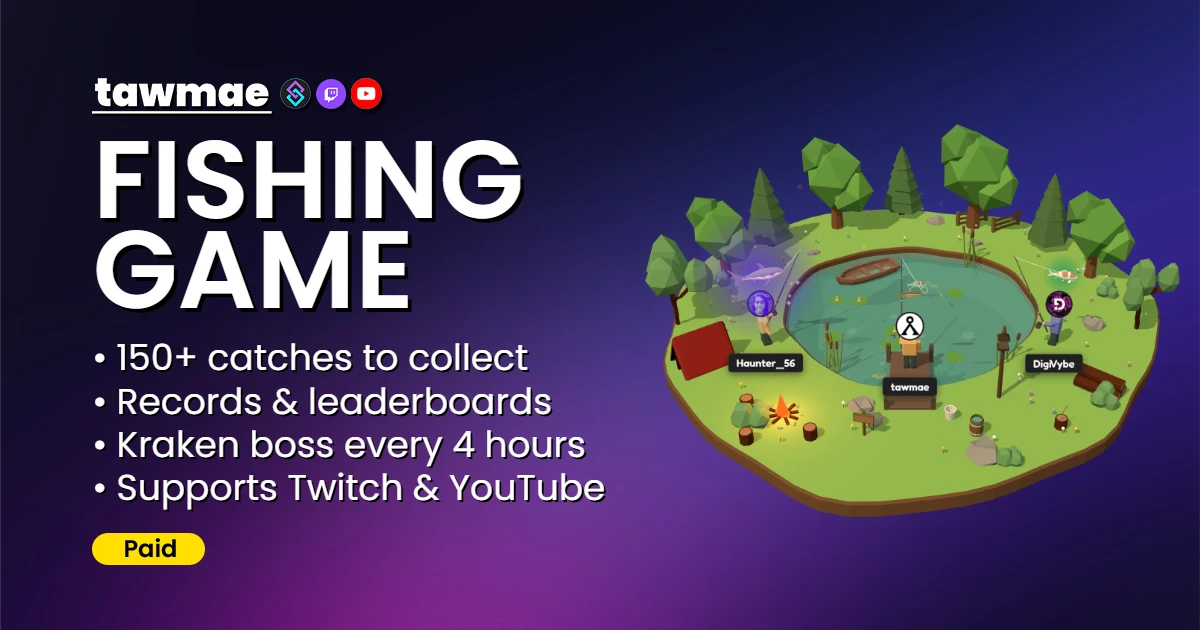
Fish on stream! Over 150 fish and special treasure items to collect, with leaderboards, collections and loyalty points support. Powered by Streamer.bot.

  • 150+ fish and special treasure items
  • Leaderboards, collections and records for your channel and worldwide
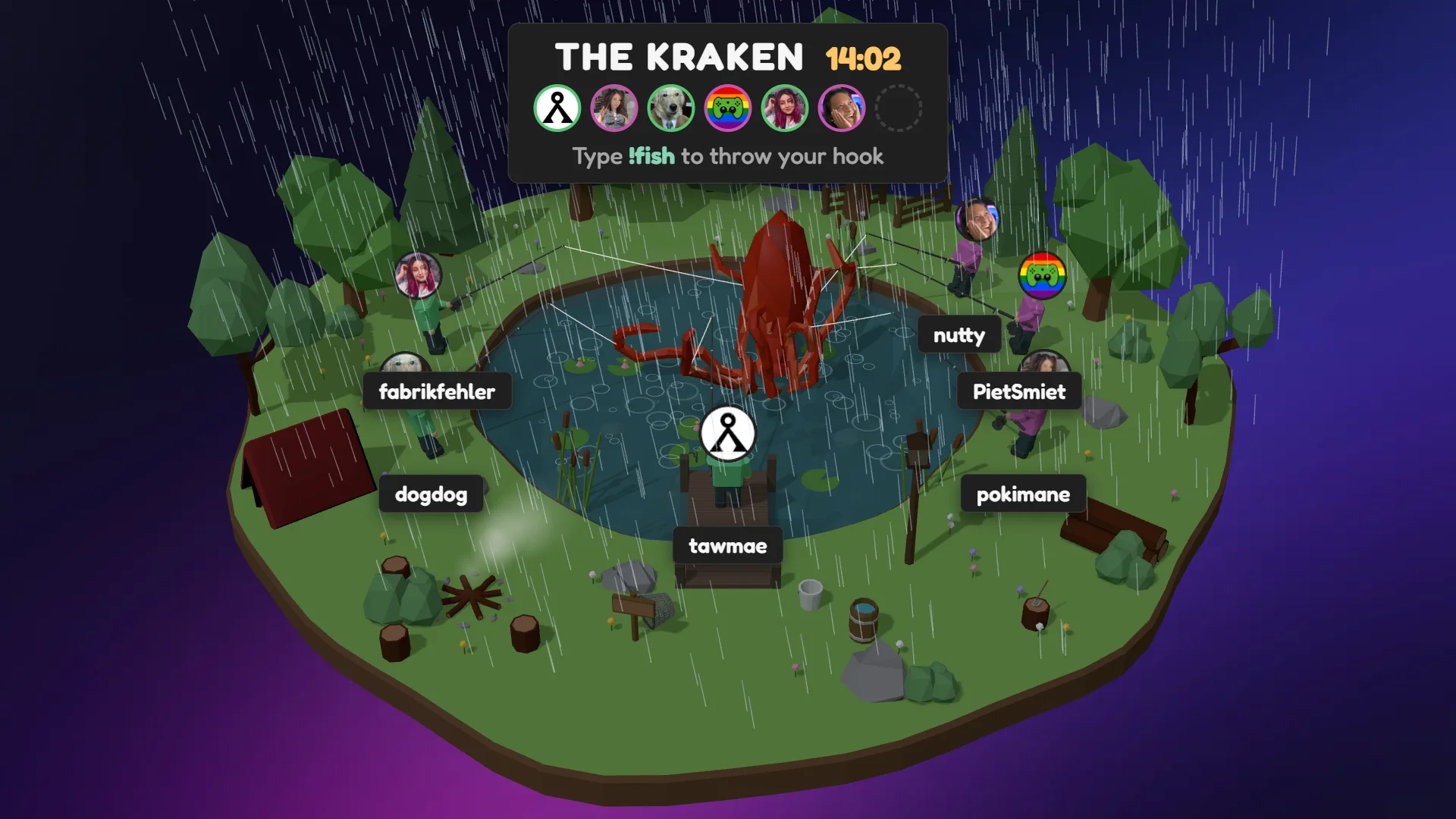
  • Special boss event: The Kraken
  • Dynamic weather and day/night cycles
  • Loyalty Points support
  • Optional Twitch Extension [COMING SOON]
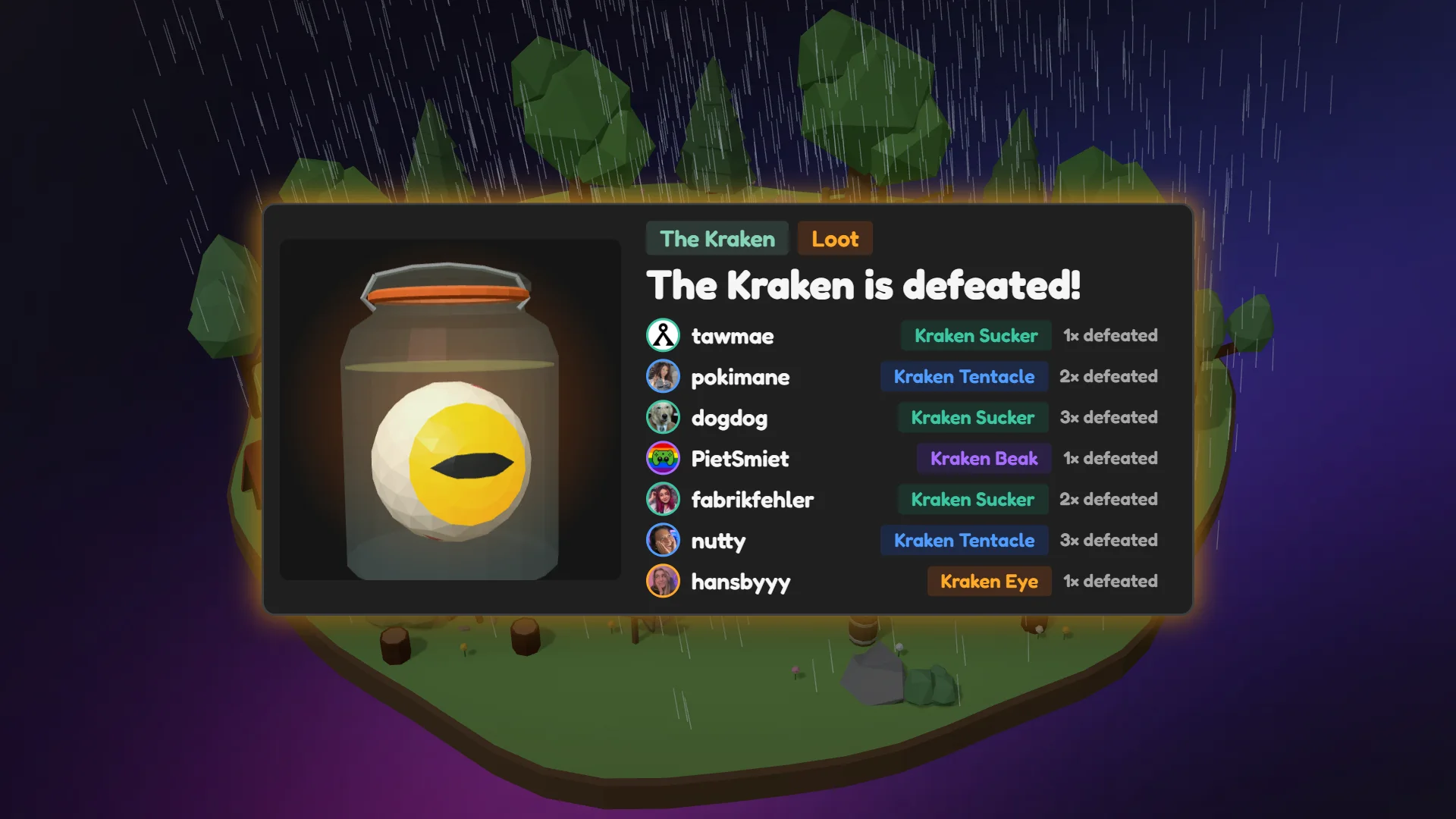
The Kraken in the FISHING GAME overlay, six fishers hooked on it in a thunderstorm
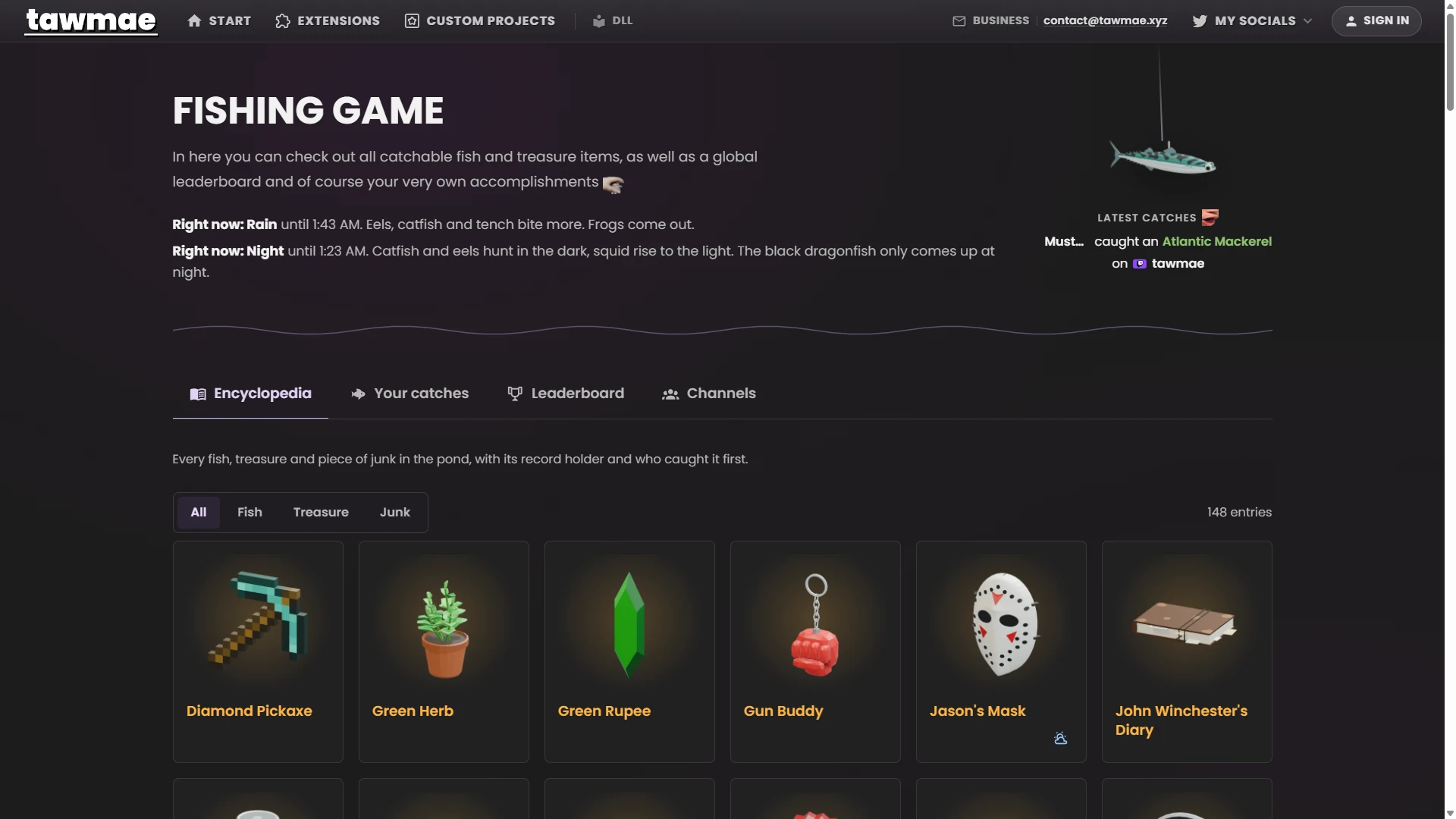
FISHING GAME encyclopedia on tawmae.xyz
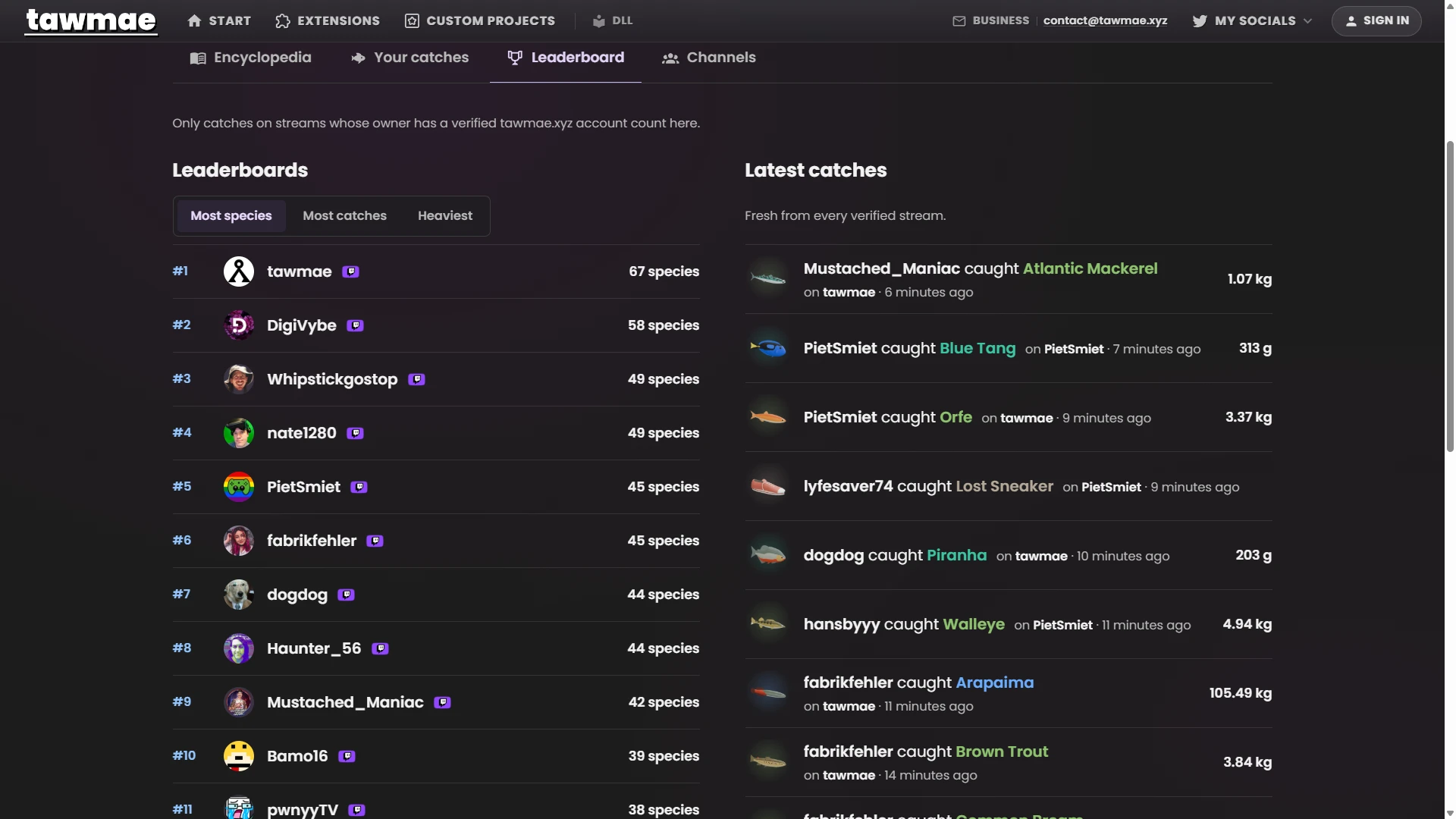
FISHING GAME leaderboards and latest catches on tawmae.xyz
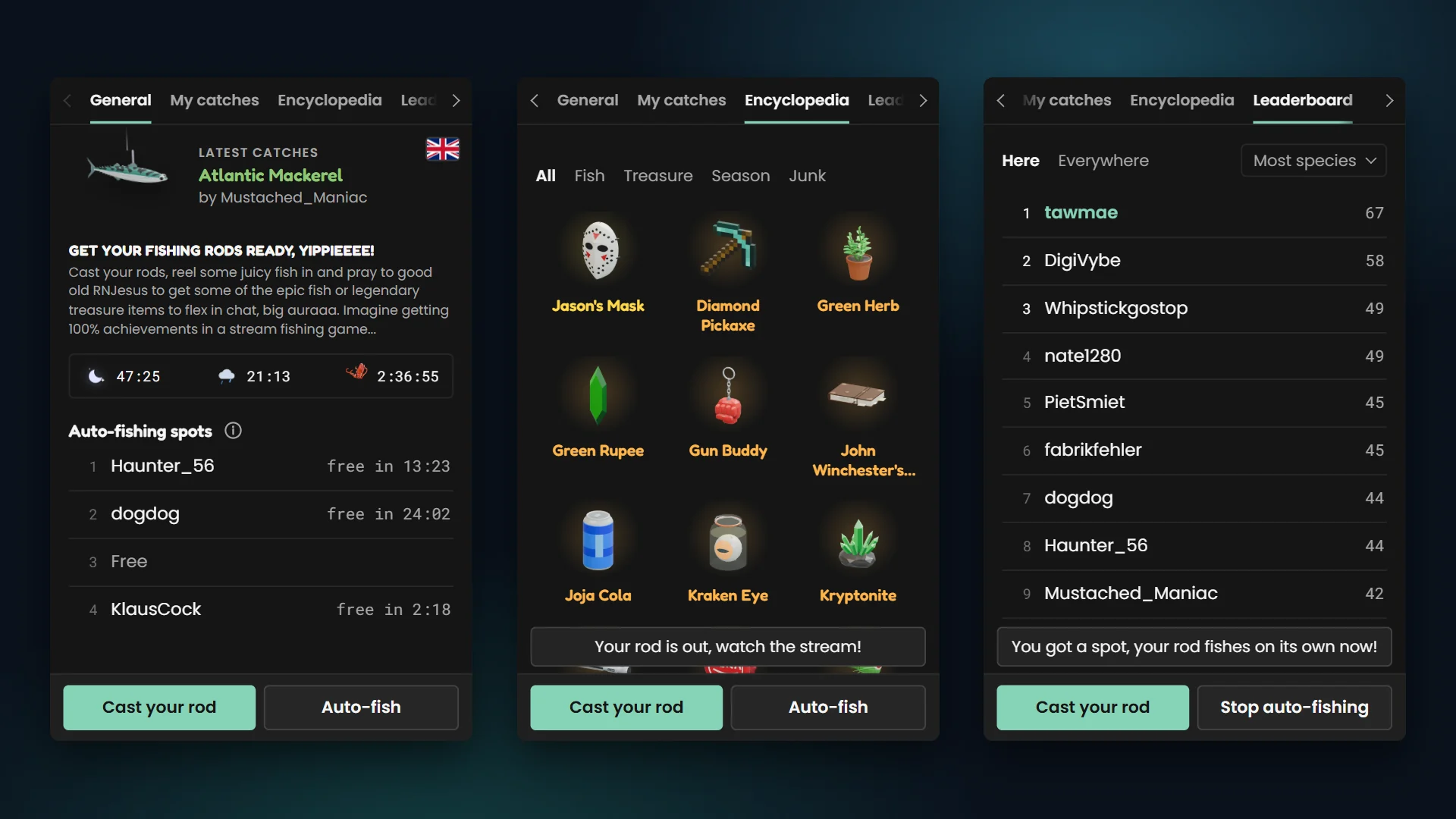
FISHING GAME Twitch extension [COMING SOON]: fishing buttons, encyclopedia and leaderboard
FISHING GAME page card

This extension uses your viewers' Twitch and YouTube names, user IDs and profile pictures for the public collections and leaderboards on tawmae.xyz. Details in the privacy policy.

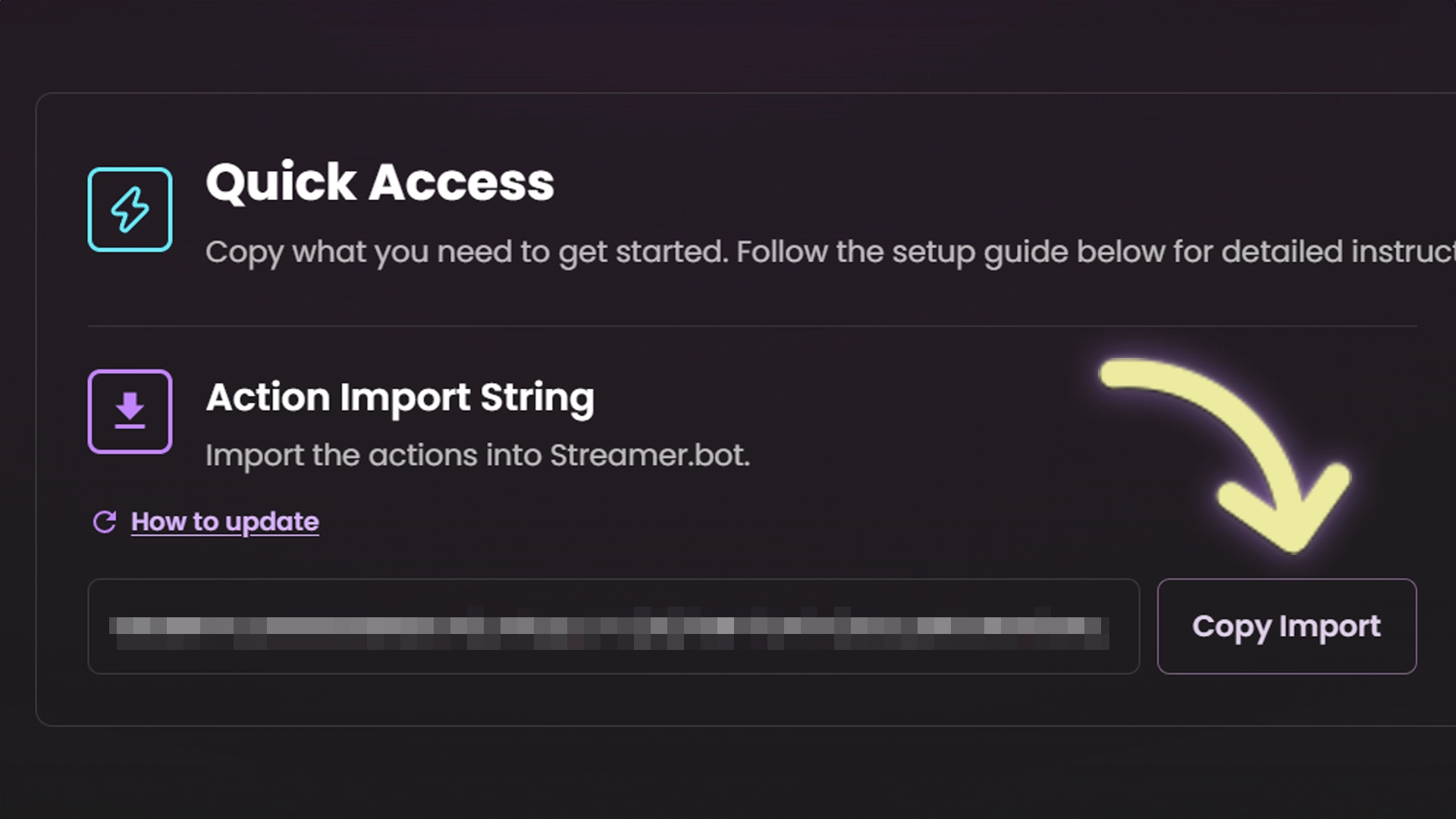
Quick Access

Copy what you need to get started. Follow the setup guide below for detailed instructions.

Action Import String

Import the actions into Streamer.bot.

Updating? Copy this again, re-import it and re-enable your commands. How to update

How to update
U0JBRR+LCAAAAAAABAB1k99P2zAQx9+R+B9MXnghVdu1he1lQqCxPUybQNo0AQ8X+5pa+EfmH5QI9X+fndRpDV2kRPF9vnc+351fj48IKSQ6KD6R17gISwUSw7L4oz2xXIiW1FpbPCnOtgLwbqVNlDhYS8ABPKOxXKtIJqPxaDwAhpYa3rgBkmutTh2humkJd0T78C6JWyG5/vF9RH6vgDFoIVi4euLq9PMJmSYniwKpI6BY539GvMXO9aG4ivG+yUYb91CQyjsXNtxLW996dUm3aSgvRGKSKy69/DUcIMLINp2iYJCVCLoYNljuewtJqMOcxVOen1O6vFjQks6BlbPJgpXVbPyxpLNZVU3nbDG/WKTkOre/Hn1X+fH2KQ980pN5ooJKYNzVGY8ZeaHCM/xitPzKrdOmDaIlCPs/1U9UjKv6kCoNxl03FDfZUHSC2mjfREVmBbGG1obKH4ppQhu1HHryjlOtqDcGlTtEneF1HXoWG/G4D6yvLnc9eswjCgGNRXYTs+15wpv+J+n7jmQhgruUIefcuMbKavqE7g7N85t8dvBK8HCOHDouk35v3HYXafqht+BLHGpksUXpfk36Mr8f3v72lSCaFQTV8dHmHwkvWlbpAwAA

Choose your access

Checking your access…

Buy this extension
15,00 €One-time payment
  • Permanent access to this extension
  • Permanent access to updates and features
  • No recurring charge
All extensions
9,99 € / monthMonthly subscription
  • Import and update all paid extensions
  • Keep using the versions you obtain after your subscription ends
  • Cancel anytime · new imports and updates require an active subscription
PAYPAL CHECKOUT

Review your checkout

  • Permanent access to this extension
  • Permanent access to updates and features
  • No recurring charge
  • Import and update all paid extensions
  • Keep using the versions you obtain after your subscription ends
  • Cancel anytime · new imports and updates require an active subscription

Terms and immediate access

Loading checkout…

Confirmation and invoices go to your PayPal email.

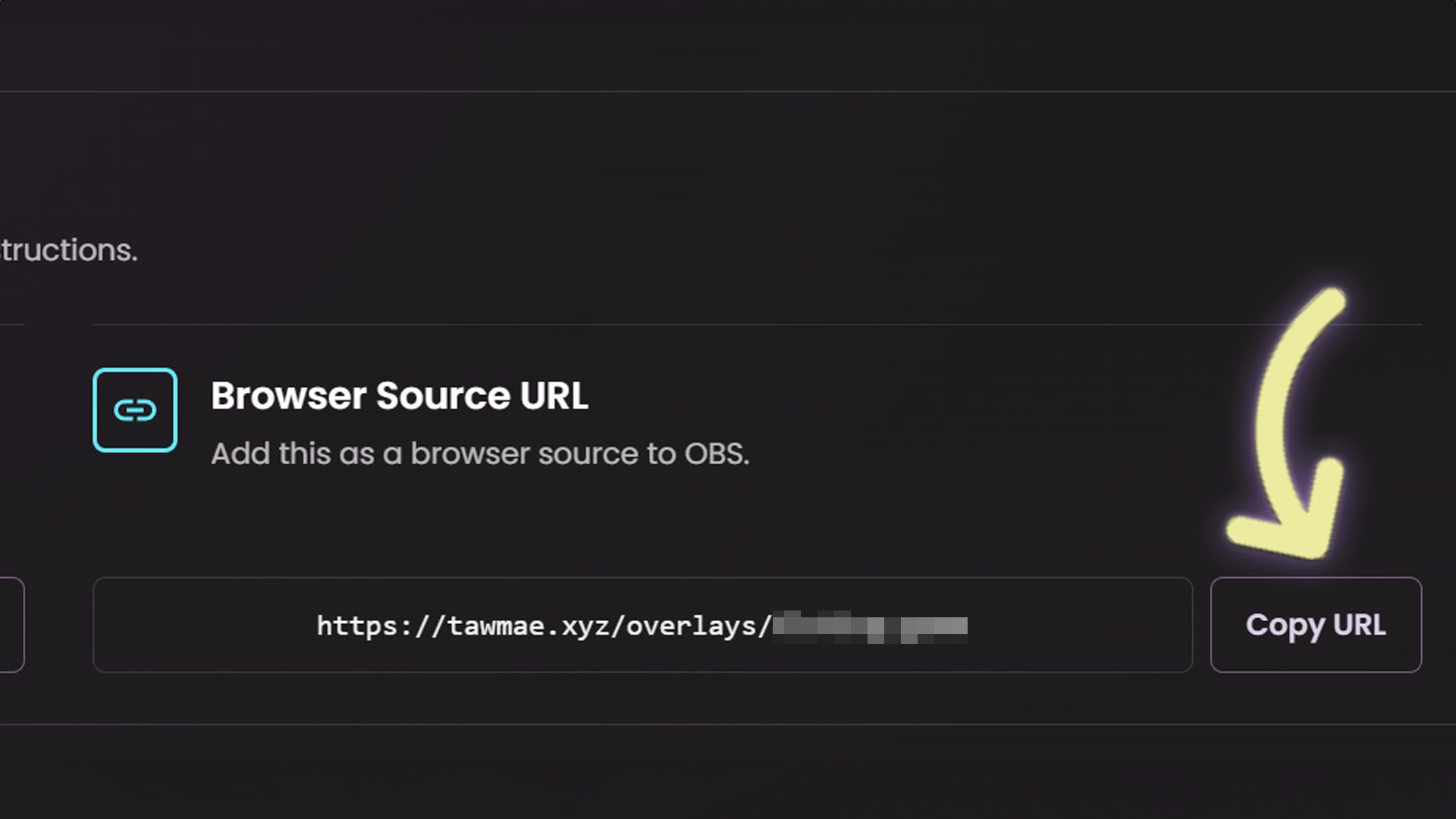
Browser Source URL

Add this as a browser source to OBS.
https://tawmae.xyz/overlays/example

Checking your access…

Buy this extension
15,00 €One-time payment
  • Permanent access to this extension
  • Permanent access to updates and features
  • No recurring charge
All extensions
9,99 € / monthMonthly subscription
  • Import and update all paid extensions
  • Keep using the versions you obtain after your subscription ends
  • Cancel anytime · new imports and updates require an active subscription

Setup Guide

1

Copy the Action Import String

Copy the Action Import String from Quick Access above.

2

Import the actions into Streamer.bot

In Streamer.bot, click Import in the top menu. Paste the text into the Import String field and hit Import.

3

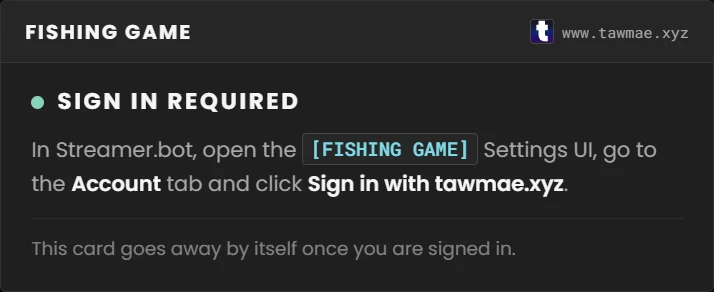
Open the Settings UI and sign in

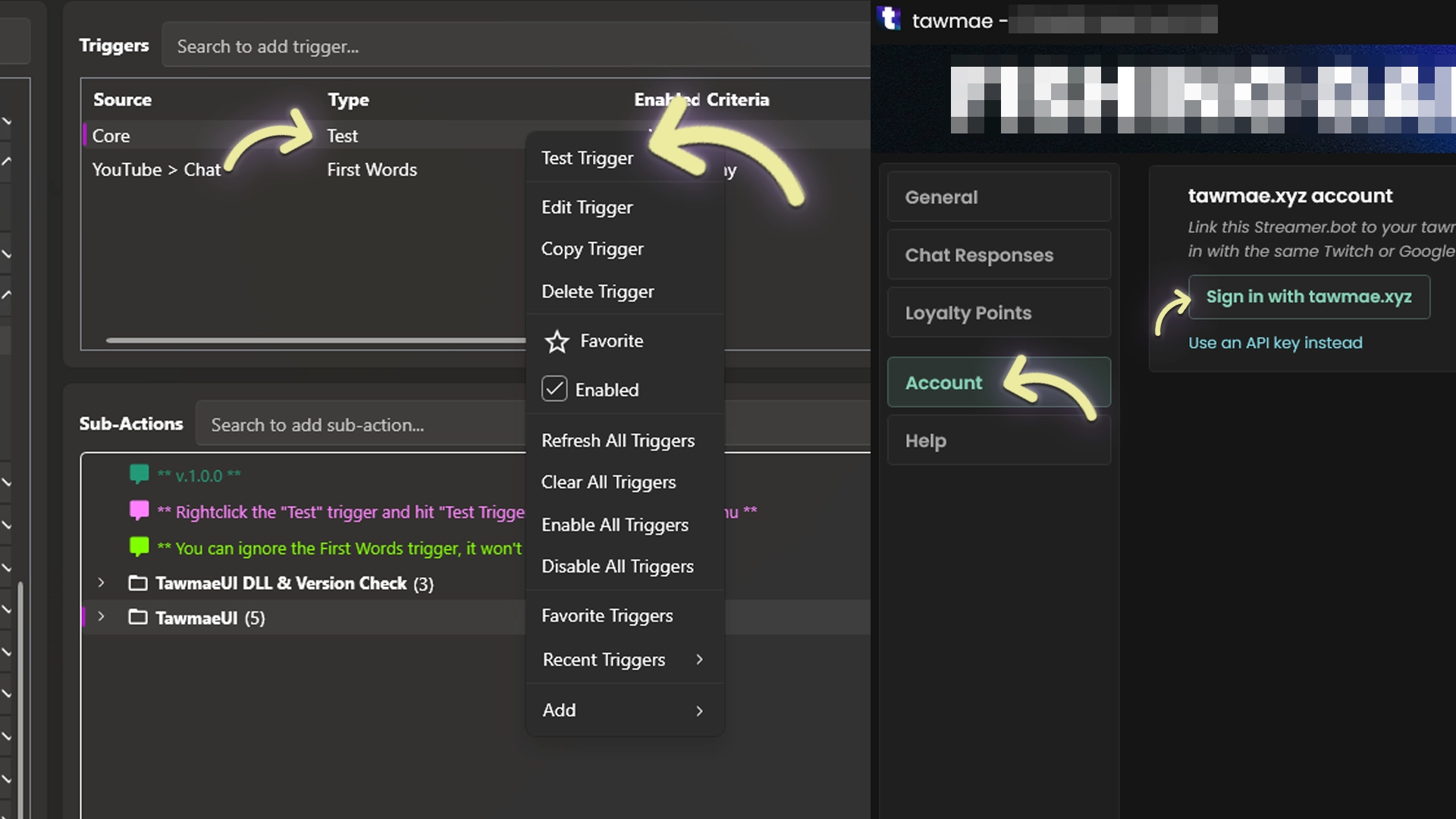
Open the action [FISHING GAME] #0 - Settings. Right-click its Test trigger and hit Test Trigger. Go to the Account tab and click Sign in with tawmae.xyz.

NoteRequires TawmaeUI.dll 1.9.0 or newer. If it is missing or outdated, the Settings action will offer to download it. Check behind Streamer.bot if the popup does not appear.
4

Start the WebSocket Server

Go to Servers/Clients → WebSocket Server. Enable Auto Start WebSocket Server, use 127.0.0.1 and port 8080, then start the server. Leave Enforce All Requests unchecked.

5

Copy the Browser Source URL

Copy the Browser Source URL from Quick Access.

6

Add the Browser Source in OBS

In OBS, create a new Browser Source and paste the URL. Set Width and Height to your canvas size (1920x1080).

WarningNeed the overlay in several scenes? Use nested scenes or source clones instead of a second browser source.
7

Check the overlay

If something is still missing, like the sign-in, the overlay shows a card that tells you what to do.

8

Done!

Your viewers can fish now :)

Commands

!fish Access Everyone

Cast your rod and catch a fish, a treasure or some junk. While The Kraken is up, it throws your hook at it instead.

!autofish Access Everyone

Claim one of the 4 auto-fishing spots for 30 minutes.

!fishLeaderboard Access Everyone

Posts the link to the collections, records and leaderboards on tawmae.xyz.

Settings UI

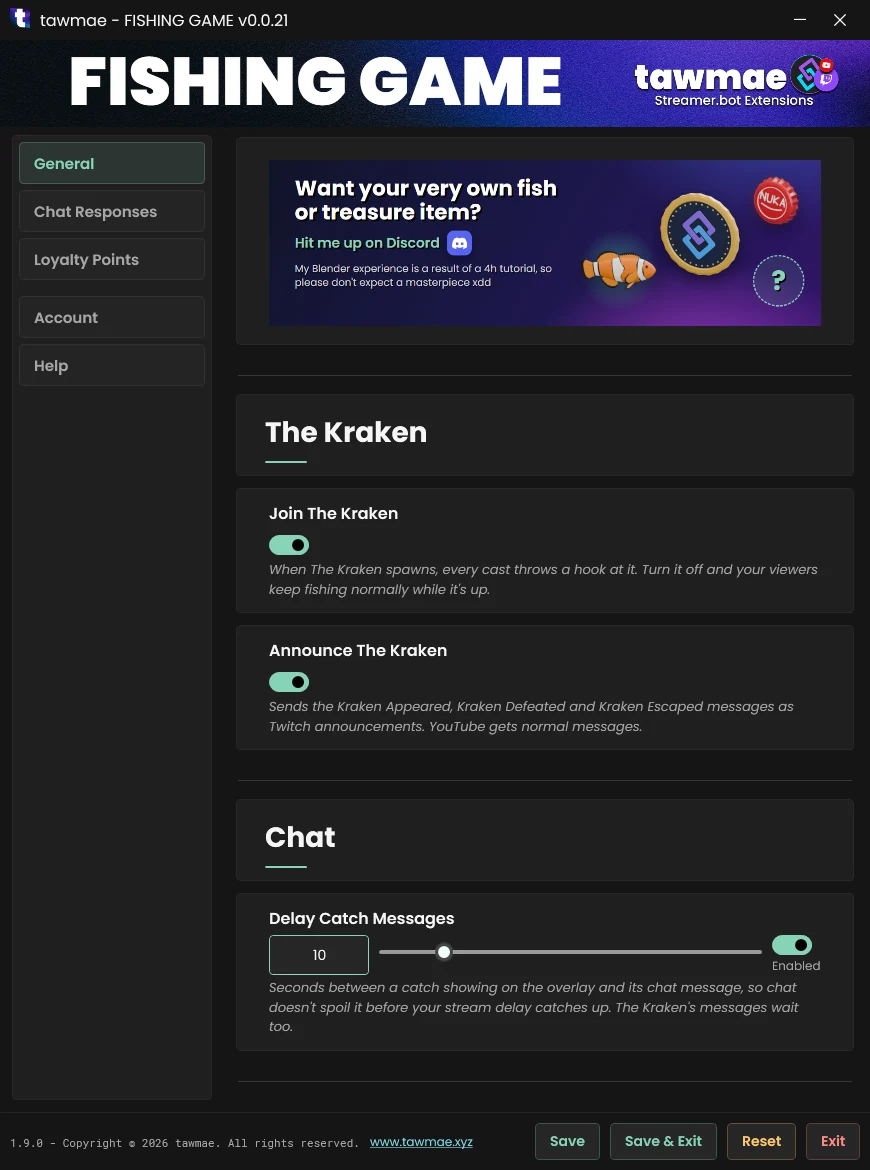
General

  • Join The Kraken On by default. Turn it off and The Kraken skips your stream: casts keep catching fish while it's up and no Kraken message goes to chat. Only the thunderstorm still comes.
  • Announce The Kraken On by default. The Kraken's spawn, defeat and escape messages go out as Twitch announcements. YouTube gets normal messages.
  • Delay Catch Messages On by default, 10 seconds. A catch's chat message waits this long after the catch shows on the overlay, so chat doesn't spoil it before your stream delay catches up. The Kraken's messages wait too.

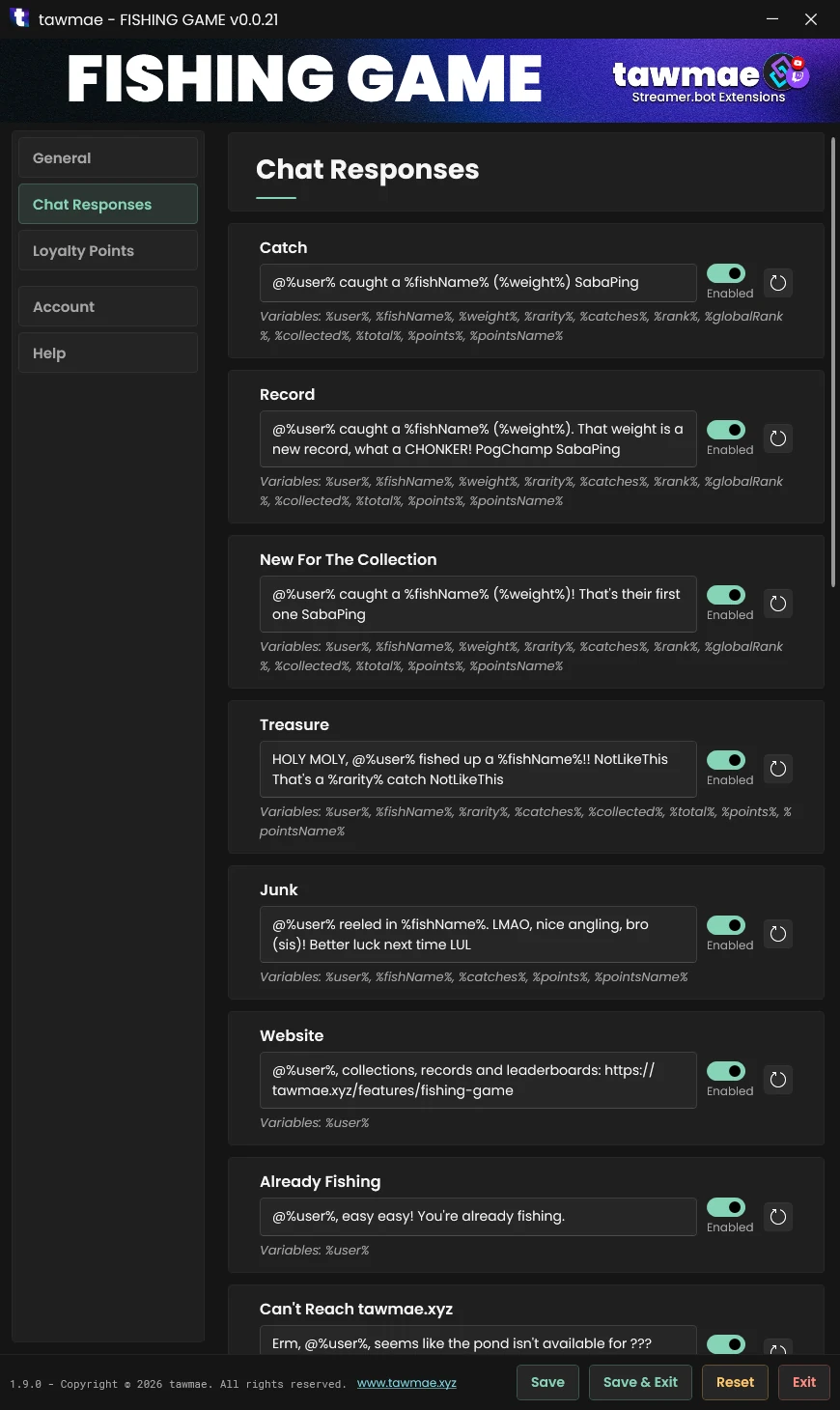
Chat Responses

What the bot says after a catch. It goes out once the catch card is on screen, after the delay set on the General tab.

  • Catch, Record, New For The Collection, Treasure, Junk One message per catch. Record, New For The Collection, Treasure and Junk replace Catch when they apply.
  • Website The link to the collections, records and leaderboards on tawmae.xyz, for !fishLeaderboard.
  • Already Fishing, Can't Reach tawmae.xyz, Overlay Not Live Sent instead of a cast when the viewer is still fishing, holds an auto-fishing spot or is already hooked on The Kraken, tawmae.xyz doesn't answer or no overlay is live in OBS. Channel points are refunded.
  • Variables %user%, %fishName%, %weight%, %fishWeight%, %rarity%, %catches%, %rank%, %globalRank%, %collected%, %total%, %event%, %weather%, %daytime%, %points%, %pointsName%. Overlay Not Live also has %broadcasterUser%.
  • Kraken Appeared When The Kraken spawns on your live overlay. %needed% is how many fishers it takes, %minutes% how long it stays.
  • Kraken Joined When a viewer's hook hits The Kraken. %fishers% of %needed% are on it.
  • Kraken Defeated When the loot card is on screen. %user% landed the final hook, %loot% lists everyone with their piece.
  • Kraken Escaped When it gets away with only %fishers% of %needed% fishers on it.
  • Auto Fishing Started, Spots Full, Cooldown When a viewer claims an auto-fishing spot, all spots are taken or their cooldown still runs. %minutes% is how long a spot lasts, %time% how long until a spot or the viewer is free again.
  • Auto Fishing Ended, Auto Fishing Stopped One message per spot instead of one per catch: when the time is up, or when the viewer gives the spot back or you clear it. %summary% reads like "18 catches (3 junk, 8 common, 5 uncommon, 2 rare)". %catches%, %breakdown%, %best% and the counts %junk%, %common%, %uncommon%, %rare%, %epic%, %legendary% and %treasure% work too, Auto Fishing Stopped also has %time%.

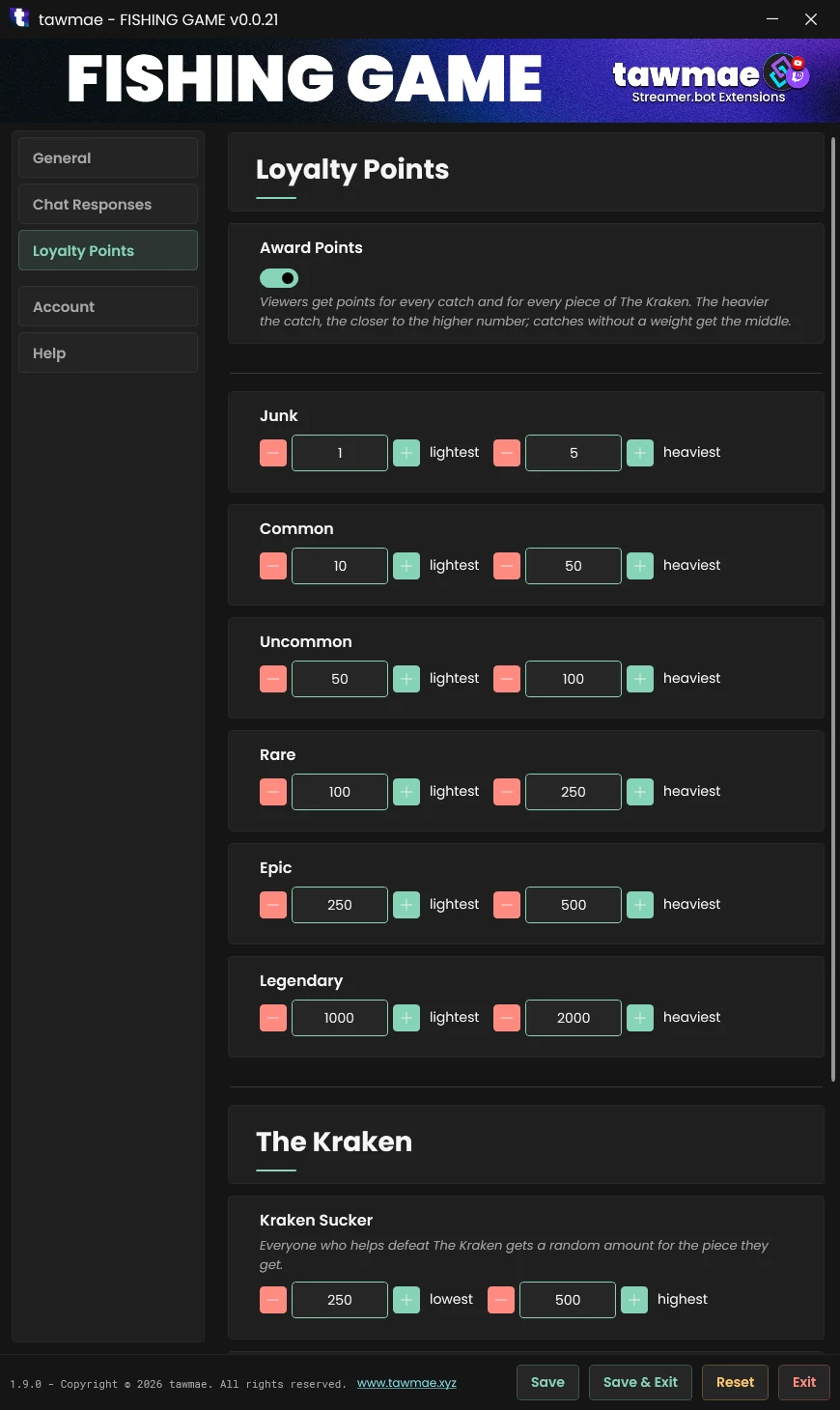
Loyalty Points

Optional, for LOYALTY POINTS 2.0.0 or newer. The points stay in your Streamer.bot; nothing about them goes to tawmae.xyz.

  • Award Points On by default when LOYALTY POINTS is installed. Every catch pays out, test casts don't.
  • Junk to Legendary A range per rarity. The heavier the catch, the closer to the higher number; catches without a weight, like junk and treasures, get the middle.
  • The Kraken A range per piece, from the Kraken Sucker to the Kraken Eye. Everyone who helps defeat it gets a random amount for the piece they get.

Overlay Settings

Settings right on the overlay

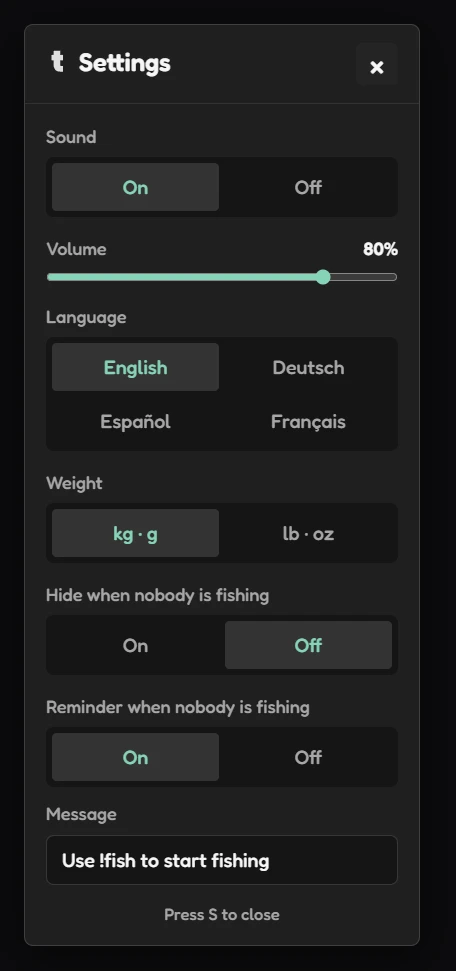
Right-click the browser source in OBS, choose Interact and press S.

Turn the sound on or off and set its volume, pick the language of the overlay (English, Deutsch, Español or Français) and choose between kg and lb for the weights. The chat messages follow the weight unit too.

Turn on Hide when nobody is fishing and the overlay only shows up while someone is fishing.

Or keep it on screen and turn on Reminder when nobody is fishing: a note like Use !fish to start fishing waits in the corner until someone casts. Write your own message, and every !command in it is highlighted.

Every change is saved in Streamer.bot right away, so every open FISHING GAME overlay picks it up.
Auto Fishing

Auto-fishing spots

Up to 4 viewers can claim an auto-fishing spot at the edge of the overlay for 30 minutes. Their rod casts by itself and something bites every 1 to 2 minutes. Every catch shows its card and counts for the collection, the leaderboards and loyalty points like any other, but chat only gets one summary at the end instead of a message per catch. Then the viewer waits 30 minutes before claiming a spot again. The 3 spots in the middle stay free for everyone who fishes the normal way, and when The Kraken spawns, the auto-fishers throw their hooks at it too.

The Kraken

A boss for the whole chat

Every 4 hours, there's a special boss event: The Kraken. You have 5 minutes to collect 7 of your chonkiest fishers to cast their hook on it and get some juicy collectables and even juicier loyalty points. And a special place on the leaderboard with it on tawmae.xyz/features/fishing-game.

Don't want it on your stream? Turn off Join The Kraken in the Settings UI.

Website & Twitch Extension

Collections, records and leaderboards

Every catch on every stream that runs the game ends up in one place: tawmae.xyz/features/fishing-game. Viewers can look up their collection, see who holds the record for each fish and who caught it first, and climb the leaderboards.

Twitch extension [COMING SOON]

A panel extension for your Twitch channel page: viewers can fish and auto-fish with a button instead of typing in chat, and see what's coming up (day and night, the weather and The Kraken), the latest catches and who holds your auto-fishing spots, their own catches, the encyclopedia, the leaderboard for your channel or everywhere, and The Kraken. In English, German, Spanish and French. You can switch the buttons off or add a cooldown in the extension's settings.

Arguments

Arguments after CastRod

CastRod sets these arguments, so the sub-actions that follow it in your reward or command action can use them, for example to play a sound on a record.

%fishingFishName% Type: string

The catch's name.

%fishingFishId% Type: string

The catch's id, e.g. greatwhite.

%fishingKind% Type: string

fish, treasure or junk.

%fishingRarity% Type: string

junk, common, uncommon, rare, epic or legendary.

%fishingWeight% Type: double

The weight in kg.

%fishingIsJunk% Type: bool

True for junk.

%fishingRecord% Type: bool

The heaviest of its kind on your channel.

%fishingNewSpecies% Type: bool

The viewer's first one of these.

%fishingPersonalBest% Type: bool

The viewer's heaviest one so far.

%fishingCatches% Type: long

How many catches the viewer has in total.

%fishingSpeciesCount% Type: long

How many of this kind the viewer has caught.

%fishingPoints% Type: long

The loyalty points this catch paid out, 0 when off.

%fishingRank% Type: int

Its place on your channel's board for this kind, 0 if not ranked.

%fishingGlobalRank% Type: int

Its place on the worldwide board, 0 if not ranked.

%fishingWeather% Type: string

The weather id, e.g. clear or rain.

%fishingDaytime% Type: string

day or night.

%fishingEvent% Type: string

The running event, empty if there is none.

%fishingCastId% Type: string

The id of this cast.

%fishingKraken% Type: string

joined or defeated while The Kraken is up, empty for a normal catch.

%fishingKrakenFishers% Type: int

How many fishers are on The Kraken now.

%fishingKrakenNeeded% Type: int

How many it takes to defeat it.

%fishingKrakenLoot% Type: string

Everyone with their piece, on a defeat.

Arguments after AutoFish

AutoFish sets these arguments for the sub-actions that follow it in your command or reward action.

%fishingAutoFish% Type: string

started, stopped (the viewer gave the spot back), full or cooldown.

%fishingAutoFishSlot% Type: int

The spot the viewer got, 1 to 4, when it started.

Attribution

Boat, dock and fishing gear

The rowboat, the dock, the paddle, the rod, the bucket, the landing net and some of the fish are from the Low Poly Fishing Pack by Floreswa.

FAQ & Examples

Can I opt out of leaderboard stats?
Unfortunately not, that's one of the selling points and I'd like to keep that feature. If you already purchased the extensions and would like to have your data removed, send me an email or DM on discord and I'll refund and erase the data.
What are the odds to catch something?
Junk ~13%
Common ~43%
Uncommon ~33%
Rare ~7%
Epic ~3%
Legendary ~0,1%
Can I commission a custom item or fish?
Sure! Hit me up on Discord.
Can I make the overlay hide if noone is fishing?
Yes, interact with the browser source, press S on your keyboard and toggle the auto-hide function.
Where can I see the leaderboards?
https://tawmae.xyz/features/fishing-game or in the Twitch Extension [COMING SOON]
How do I remove someone from an auto-fishing spot?
Interact with the browser source, press S on your keyboard and click the × next to their name, or Clear all to free every spot. Viewers can also give their spot back by typing !autofish again. Their 30-minute cooldown keeps running either way.
Can I use my own sounds?
Yes! Interact with the browser source, press S on your keyboard and click the cog next to Sound. Every sound has a pencil icon, paste a link to an mp3, wav or ogg file there and hit play to test it. Files from your PC won't work because browsers don't let websites open files on your computer, so upload your sound somewhere first and use that link.

Changelog

v1.0.0 latest

  • New Release

User Reviews

5.0 (1 reviews)

Awesome plugin! Easy to use, fun, and a great way to boost viewer engagement. Definitely the best Fishing Game version available for streams! Highly recommended! ⭐⭐⭐⭐⭐

Before you post your review

Please make sure this is not a support issue. If you have trouble getting it to work, join my Discord, open a support post and attach your logs.

Join the Discord for support ↗