15,00 € TWITCH YOUTUBE BROWSER SOURCE DLL REQUIRED

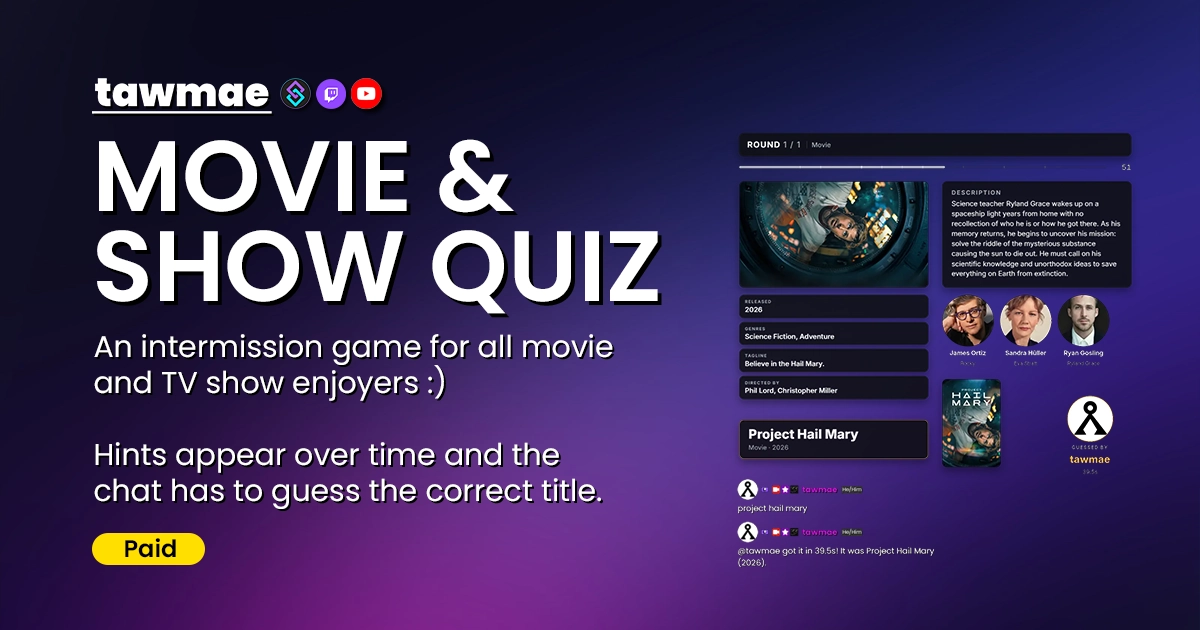
Any movie and quiz enjoyers in chat?? A random movie or TV show gets picked, hints drop over time and the first one to guess the title wins. Powered by Streamer.bot.

  • Perfect intermission game while you're afk or running ads
  • Thousands of movies & TV shows
  • Hints drop over time, the scene unblurs and letters fill in
  • A dock to run the quiz and sneak a peek at the answer
  • Customize the whole overlay right inside OBS, including TTS support
Movie & Show Quiz preview

Quick Access

Copy what you need to get started. Follow the setup guide below for detailed instructions.

Action Import String

Import the actions into Streamer.bot.
U0JBRR+LCAAAAAAABAB1k99P2zAQx9+R+B9MXnghVdu1he1lQqCxPUybQNo0AQ8X+5pa+EfmH5QI9X+fndRpDV2kRPF9vnc+351fj48IKSQ6KD6R17gISwUSw7L4oz2xXIiW1FpbPCnOtgLwbqVNlDhYS8ABPKOxXKtIJqPxaDwAhpYa3rgBkmutTh2humkJd0T78C6JWyG5/vF9RH6vgDFoIVi4euLq9PMJmSYniwKpI6BY539GvMXO9aG4ivG+yUYb91CQyjsXNtxLW996dUm3aSgvRGKSKy69/DUcIMLINp2iYJCVCLoYNljuewtJqMOcxVOen1O6vFjQks6BlbPJgpXVbPyxpLNZVU3nbDG/WKTkOre/Hn1X+fH2KQ980pN5ooJKYNzVGY8ZeaHCM/xitPzKrdOmDaIlCPs/1U9UjKv6kCoNxl03FDfZUHSC2mjfREVmBbGG1obKH4ppQhu1HHryjlOtqDcGlTtEneF1HXoWG/G4D6yvLnc9eswjCgGNRXYTs+15wpv+J+n7jmQhgruUIefcuMbKavqE7g7N85t8dvBK8HCOHDouk35v3HYXafqht+BLHGpksUXpfk36Mr8f3v72lSCaFQTV8dHmHwkvWlbpAwAA

Choose your access

Checking your access…

Buy this extension
15,00 €One-time payment
  • Permanent access to this extension
  • Permanent access to updates and features
  • No recurring charge
Other payment methods

For Ko-fi, crypto or bank transfer, contact me on Discord or via email.

All extensions
9,99 € / monthMonthly subscription · PayPal
  • Import and update all paid extensions
  • Keep using the versions you obtain after your subscription ends
  • Cancel anytime · new imports and updates require an active subscription
PAYPAL CHECKOUT

Review your checkout

Terms and immediate access

Loading checkout…

Confirmation and invoices go to your PayPal email.

Browser Source URL

Add this as a browser source to OBS.
https://tawmae.xyz/overlays/example

Checking your access…

Buy this extension
15,00 €One-time payment
  • Permanent access to this extension
  • Permanent access to updates and features
  • No recurring charge
Other payment methods

For Ko-fi, crypto or bank transfer, contact me on Discord or via email.

All extensions
9,99 € / monthMonthly subscription · PayPal
  • Import and update all paid extensions
  • Keep using the versions you obtain after your subscription ends
  • Cancel anytime · new imports and updates require an active subscription

Dock URL

Add this as a custom browser dock to OBS.
https://tawmae.xyz/overlays/example

Checking your access…

Buy this extension
15,00 €One-time payment
  • Permanent access to this extension
  • Permanent access to updates and features
  • No recurring charge
Other payment methods

For Ko-fi, crypto or bank transfer, contact me on Discord or via email.

All extensions
9,99 € / monthMonthly subscription · PayPal
  • Import and update all paid extensions
  • Keep using the versions you obtain after your subscription ends
  • Cancel anytime · new imports and updates require an active subscription

Setup Guide

1

Copy the Action Import String

Copy the Action Import String from Quick Access.

2

Import the actions into Streamer.bot

In Streamer.bot click Import in the top menu. Paste the string into the Import String field and hit Import at the bottom.

3

Enable the commands

Open the Commands tab and find the imported group. Right-click the group and hit Group → Enable All.

4

Run the Settings UI once

Open the action MOVIE & SHOW QUIZ #0 - Settings. Right-click the Test trigger and hit Test Trigger. Set things up how you like and hit Save. The quiz won't start until you've saved once.

5

Start WebSocket Server

Go to the tab Servers/Clients → WebSocket Server. Enable Auto Start WebSocket Server. Address 127.0.0.1. Port 8080. Start the server. If you use a password or a different address/port, add the matching connection parameters to both URLs; see the FAQ below.

6

Copy Browser Source URL

Copy the Browser Source URL from Quick Access.

7

Add Browser Source in OBS

In OBS create a new Browser Source and paste the URL. Set Width to 1920 and Height to 1080. Scale the source to fit your scene if your canvas is different.

NoteIf you want to have the browser source in multiple scenes, don't create a second browser source. Instead, use nested scenes or source clones.
8

Open the overlay panel

Select the browser source in OBS, hit Interact and press S. The panel opens right on top of the overlay and everything you change shows up live. Hit the disk icon (or Ctrl+S) to save, it pulses when you have unsaved changes.

NoteYou can also open the overlay URL in your browser and set it up there. It all saves into Streamer.bot, so OBS picks it up right away. Bonus: in a browser you can load your installed fonts, OBS blocks that.
9

Copy Dock URL

Copy the Dock URL from Quick Access.

10

Add Custom Dock in OBS

In OBS click Docks → Custom Browser Docks in the menu bar. Type any name into an empty row, paste the URL next to it and hit Apply. Then drag the dock wherever you want it in your OBS layout.

NoteDon't want it in OBS? The dock works in any browser, too.
11

Done!

And you are done! Type !quiz in chat or hit Start quiz in the dock and let chat guess away :)

Commands

These are the suggested command names. Change names, permissions and cooldowns on the commands in Streamer.bot.

User Commands

!quizstats Access Everyone

Tells you how many titles you guessed so far and how chat is doing overall.

Example!quizstats

Mod Commands

!quiz [Rounds (optional)] Access Mods Only

Starts a quiz. No number means a single round, a number plays that many rounds (up to 100), and 'endless' or 'infinite' keeps it going until you end it.

Example!quiz 5
!quizhint Access Mods Only

Drops the next hint right now.

Example!quizhint
!quizskip Access Mods Only

Shows the answer and moves on to the next round.

Example!quizskip
!quizend Access Mods Only

Ends the quiz after the current round. The answer still gets shown.

Example!quizend
!quizstop Access Mods Only

Stops the quiz right away, without showing the answer.

Example!quizstop

Settings UI

General

What chat plays, how long they get and where the quiz talks.

  • Media Mix How often a round picks a movie or a TV show. 70% movies does not guarantee seven movies in ten rounds; each round gets its own pick. Push it all the way to one side for movies or shows only.
  • Game Language The language for titles, descriptions, taglines and genres. Missing translations fall back to English. English and original titles still count as guesses. This does not filter where a movie or show was made.
  • Round Length Time to guess: 20–600 seconds, 90 by default. Hint times count from the start of each round.
  • Answer Screen & Final Scores Screen The answer stays up for 10 seconds by default, then the next round starts. Final scores stay up for 15 seconds. A single-round quiz skips the final scores screen.
  • Chat Platforms Choose Twitch, YouTube or both. These are the chats the quiz listens to and posts in.
  • Description To Chat & Hints To Chat Two separate toggles, both off by default. Post the description and/or text hints when they appear. Scene images and title letters stay on the overlay.
  • Hide Character Names Blanks out character names in descriptions, taglines and cast hints. On by default, so Frodo does not immediately give the whole thing away. The title itself is always hidden in hints until the answer is revealed.
  • Read Hints Aloud Connect Speaker.bot to Streamer.bot, enter a Speaker.bot voice alias and enable the toggle. It reads the description and text hints; typing a voice alias alone does not turn it on.
  • Loyalty Points Reward Enable it and choose 1–5,000 points for the winner. Off by default. Needs my LOYALTY POINTS extension on 2.0.0 or newer. Awarding a close guess from the dock pays the reward too.

Movies

Make the pool easier, harder, or just less full of films nobody in your chat has seen.

  • Release Years Only movies released between these years, both included. Starts at 1970 by default.
  • Minimum Votes How many TMDB ratings a movie needs, not how high its rating is. Defaults to 1,500. Raise it for better-known titles.
  • Minimum Rating The average TMDB score out of 10. Defaults to 6. A popular film can still be excluded if its score is too low.
  • Most Voted Only Pick from this many of the most-rated movies that pass your other filters. Defaults to 1,000. A smaller pool generally makes it easier. Set it to 0 to remove this extra limit.
  • Genre Rule & Genres “Skip unchecked genres” rejects a movie if it has even one unchecked genre. “Any checked genre” accepts it if it has at least one checked genre. So a comedy/horror film behaves differently depending on the rule. Documentary, TV Movie and Music are unchecked by default.
  • Original Languages Which languages the movies were originally made in. English is checked by default. Nothing checked allows every language. The Game Language setting still controls the language of the clues.

TV Shows

Separate filters for shows. Changing these does not change your movie pool.

  • Release Years Uses the year a show first aired, not the release year of its latest season. Starts at 1990 by default.
  • Votes, Rating & Pool Works like the movie filters. Defaults: at least 500 votes, a rating of 6/10, and the 500 most-rated shows that pass the filters. Most Voted Only set to 0 removes that extra limit.
  • Genre Rule & Genres The same two genre rules as movies. Documentary, Kids, News, Reality, Soap and Talk are unchecked by default.
  • Original Languages English by default. Check more languages if you want them in the pool, or uncheck everything to allow all languages.

Hints

Each hint has an on/off switch and a time in seconds. 0 means right away. A hint scheduled after the round ends will not appear during normal play, though the dock can reveal it early.

  • Text Hints Default timing: description at 0s, release year at 15s, genres at 25s, tagline at 35s and director/creator at 45s. A missing tagline is skipped. For shows, the year hint also includes seasons and episodes.
  • Cast Third actor at 50s, second actor at 60s and lead actor at 70s by default. These use TMDB billing order. Character names stay hidden if Hide Character Names is enabled.
  • Scene Image Defaults to 55s. How blurry it looks and whether a fully blurred preview appears before then are set in the overlay panel, under Elements → Scene image.
  • Title Layout Shows the title as empty letter slots. Defaults to 75s. Letter Reveal can make the layout appear earlier, so these are not two steps that must happen in order.
  • Letter Reveal & Letters Revealed Letters start filling in at 60s by default, reaching up to 35% by the end of the round. Change the share from 5–80%. The full title is shown when the round ends; it is not meant to spell out the whole answer before then.

Chat Responses

Edit the quiz announcements, winner messages, stats reply and the reply for close guesses. Put a single hyphen (-) in a response to turn it off. The available variables are listed below each textbox.

  • Overlay labels “Starring”, “Guessed by” and the other on-screen labels live in the overlay panel’s Text tab. The Movie/TV show names and hint labels from there are also used in chat.

Stats

Quiz totals, rounds played and how many chat solved, split into movies and shows too.

  • Reset Stats Resets quiz totals, viewers’ correct guesses and the all-time leaderboard. This cannot be undone. It does not clear recently played titles. Reopen the Settings UI to see the updated totals.
  • Clear History Forgets the recently played movies and shows so they can be picked again. Your stats and scores stay as they are.

The Overlay Panel

Elements

Every part of the overlay is its own element: round header, timer, scene image, description, hints, cast photos, title letters, answer card, poster, winner, final scores and all-time scores. Drag them around on the canvas, pull the corner to scale them and the edge to make them wider. Anything you don't need goes away with the eye icon.

Click an element to see its options, like the timer style (bar, ring or just numbers), how blurry the scene starts or how big the cast photos are.

To check how it all looks mid-game, switch the preview between Round, Answer and Scores, or hit Simulate for a quick fake round with hints, letters and a winner. Messed up the layout? Every tab has a Reset at the bottom that only resets that tab.
The elements tab with the element list and its options

Theme

The look of the whole thing: font, colors, corner radius, borders, shadow and whether stuff animates. Single elements can still get their own colors on the Elements tab.

For the font, pick one from the list or type the name of any Google Font or any font installed on your PC. Load installed fonts adds all of them to the list, but OBS blocks that, so do it with the overlay open in your browser.
The theme tab with font, colors and shape

Text

Every label on the overlay, like Starring, Guessed by or Nobody got it. Translate them or rename them however you like. Movie and TV show are also what the quiz says in chat.

Chat messages are not in here, those live in the Settings UI under Chat Responses.
The text tab with every label on the overlay

The Dock

Run the quiz from OBS

Your remote control for the quiz. Pick the rounds (or ∞ for endless), movies, shows or both, and hit Start quiz. Choosing both uses your Media Mix. If your mix is set to only movies or only shows, choosing both in the dock uses 50/50 instead.

While a round is running you can pause it, drop the next hint early, add 15 seconds, skip it, or Reroll the title if it's something nobody on this planet has ever seen. Last round ends the quiz after the current round, Stop ends it right away without the answer or final scores (click twice, so you don't do it by accident). On the answer screen, Next skips the remaining wait.

The answer stays hidden until you click it, so you can play along without spoiling it for yourself. Click the eye if you'd rather always see it.

Close guesses shows everyone who was almost right. If someone clearly meant the right title and the quiz didn't let it through, hit Award and they get the win.
The dock with the round controls, the hidden answer and close guesses

Custom Triggers

Quiz Started

Fires when a quiz starts.

%quizId% Type: string

Unique ID of this quiz, the same for every round.

Example a1b2c3d4e5f6
%quizRounds% Type: int

How many rounds will be played. 0 when endless.

Example 5
%quizMedia% Type: string

What the quiz picks from: 'movie', 'tv' or 'both'.

Example both

Round Started

Fires when a round starts and the title has been picked.

%quizId% Type: string

Unique ID of this quiz.

Example a1b2c3d4e5f6
%quizRound% Type: int

The current round.

Example 2
%quizRounds% Type: int

How many rounds will be played. 0 when endless.

Example 5
%quizMedia% Type: string

What this round is: 'movie' or 'tv'.

Example movie
%quizSeconds% Type: int

How long chat has to guess, in seconds.

Example 90

Hint Revealed

Fires for every hint that shows up, the scene image and the title layout included.

%quizId% Type: string

Unique ID of this quiz.

Example a1b2c3d4e5f6
%quizRound% Type: int

The current round.

Example 2
%quizHintType% Type: string

What kind of hint it is: 'description', 'year', 'genres', 'tagline', 'creators', 'actor', 'still' or 'mask'.

Example actor
%quizHintLabel% Type: string

The label of the hint, as it shows on the overlay.

Example Starring
%quizHintText% Type: string

The hint itself, with the title blanked out. Empty for the scene image and the title layout.

Example Keanu Reeves as ███
%quizHintImage% Type: string

Image URL for actor and scene hints, empty for everything else.

Example https://image.tmdb.org/t/p/w185/abc.jpg

Round Solved

Fires when someone guesses the title, or when you award it from the dock.

%user% Type: string

The display name of the winner.

Example JohnDoe
%userName% Type: string

The login name of the winner.

Example johndoe
%userId% Type: string

The platform user ID of the winner.

Example 12345678
%userType% Type: string

Where the winner is from: 'twitch' or 'youtube'.

Example twitch
%quizSeconds% Type: double

How long it took them, in seconds.

Example 23.4
%quizUserCorrect% Type: int

How many titles this viewer has guessed in total.

Example 17
%quizAwardedByHand% Type: bool

True if you gave them the win from the dock.

Example false
%quizPoints% Type: int

Loyalty points the winner got. 0 if the reward is off.

Example 100
%quizId% Type: string

Unique ID of this quiz.

Example a1b2c3d4e5f6
%quizRound% Type: int

The current round.

Example 2
%quizRounds% Type: int

How many rounds will be played. 0 when endless.

Example 5
%quizOutcome% Type: string

How the round ended. Always 'solved' here.

Example solved
%quizMedia% Type: string

What this round was: 'movie' or 'tv'.

Example movie
%quizTitle% Type: string

The title in your game language.

Example Spirited Away
%quizOriginalTitle% Type: string

The original title.

Example 千と千尋の神隠し
%quizYear% Type: string

The year the movie came out, or the year the show first aired.

Example 2001
%quizTmdbId% Type: int

The TMDB ID of the title.

Example 129

Round Not Solved

Fires when the time runs out or the round gets skipped.

%quizId% Type: string

Unique ID of this quiz.

Example a1b2c3d4e5f6
%quizRound% Type: int

The current round.

Example 2
%quizRounds% Type: int

How many rounds will be played. 0 when endless.

Example 5
%quizOutcome% Type: string

How the round ended: 'timeout' or 'skipped'.

Example timeout
%quizMedia% Type: string

What this round was: 'movie' or 'tv'.

Example movie
%quizTitle% Type: string

The title in your game language.

Example Spirited Away
%quizOriginalTitle% Type: string

The original title.

Example 千と千尋の神隠し
%quizYear% Type: string

The year the movie came out, or the year the show first aired.

Example 2001
%quizTmdbId% Type: int

The TMDB ID of the title.

Example 129

Quiz Finished

Fires when a quiz with more than one round is over, endless ones included. Not when you stop a quiz right away.

%quizId% Type: string

Unique ID of this quiz.

Example a1b2c3d4e5f6
%quizPlayed% Type: int

How many rounds were played.

Example 5
%quizSolved% Type: int

How many of them chat solved.

Example 4
%quizRounds% Type: int

How many rounds were planned. 0 when endless.

Example 5
%quizTopUser% Type: string

The display name of whoever guessed the most. Empty if nobody got anything.

Example JohnDoe
%quizTopUserId% Type: string

The platform user ID of the top guesser.

Example 12345678
%quizTopUserType% Type: string

Where the top guesser is from: 'twitch' or 'youtube'.

Example twitch
%quizTopCount% Type: int

How many titles the top guesser got.

Example 3

FAQ

The dock connects but the quiz will not start. What now?
First open the Settings UI and hit Save. Check that the handler action is enabled and that you have TawmaeUI.dll 1.8.7 or newer. If filters are too narrow, try lowering Minimum Votes, widening Release Years or allowing more genres. Still stuck? Join my Discord, open a support post and attach your Streamer.bot logs.
How exact does a guess have to be?
Not very. Capitals, punctuation and a 'The' at the start don't matter, small typos are fine and it even counts when someone writes i think it's the matrix. The original title and the English title count too, and for long titles a part is enough, so Fallout works for Mission: Impossible - Fallout.

Numbers have to be right though, Toy Story is not Toy Story 3. If someone gets close but not quite there, the quiz tells them in chat NotLikeThis and they show up under Close guesses in the dock, where you can still give them the win.
The titles are way too hard (or too easy). What do I change?
Head to the Movies and TV Shows tabs in the Settings UI. Minimum Votes and Most Voted Only matter the most: the smaller the Most Voted Only pool, the more it sticks to the big, well known stuff. You can also move hints earlier on the Hints tab, or let more letters fill in.
Can the same title come up twice?
Not for a long while. The quiz remembers the last 200 movies and the last 200 shows and skips them. If you want them back in the pool, hit Clear History on the Stats tab of the Settings UI.
Can I play without the overlay?
Yep. Turn on Description To Chat and Hints To Chat on the General tab and all text hints get posted into chat. The scene image and the title letters only exist on the overlay though.
Can the winner get loyalty points?
Yes, with my LOYALTY POINTS extension on 2.0.0 or newer. Set the amount on the General tab of the Settings UI and turn it on. Want to give out something else instead? The Round Solved trigger comes with the winner's name and ID, so you can hang whatever you want off it.
Can I guess along?
Sure, your own messages count just like everyone else's. Just don't peek at the answer in the dock first Kappa

Changelog

v1.0.0 latest

  • New Release

User Reviews

5.0 (1 reviews)

This is actually neat! Thanks for coming up with this idea. I will try it out on my next giveaway event! <3

Before you post your review

Please make sure this is not a support issue. If you have trouble getting it to work, join my Discord, open a support post and attach your logs.

Join the Discord for support ↗